Natural language search for a Java table with webforJ

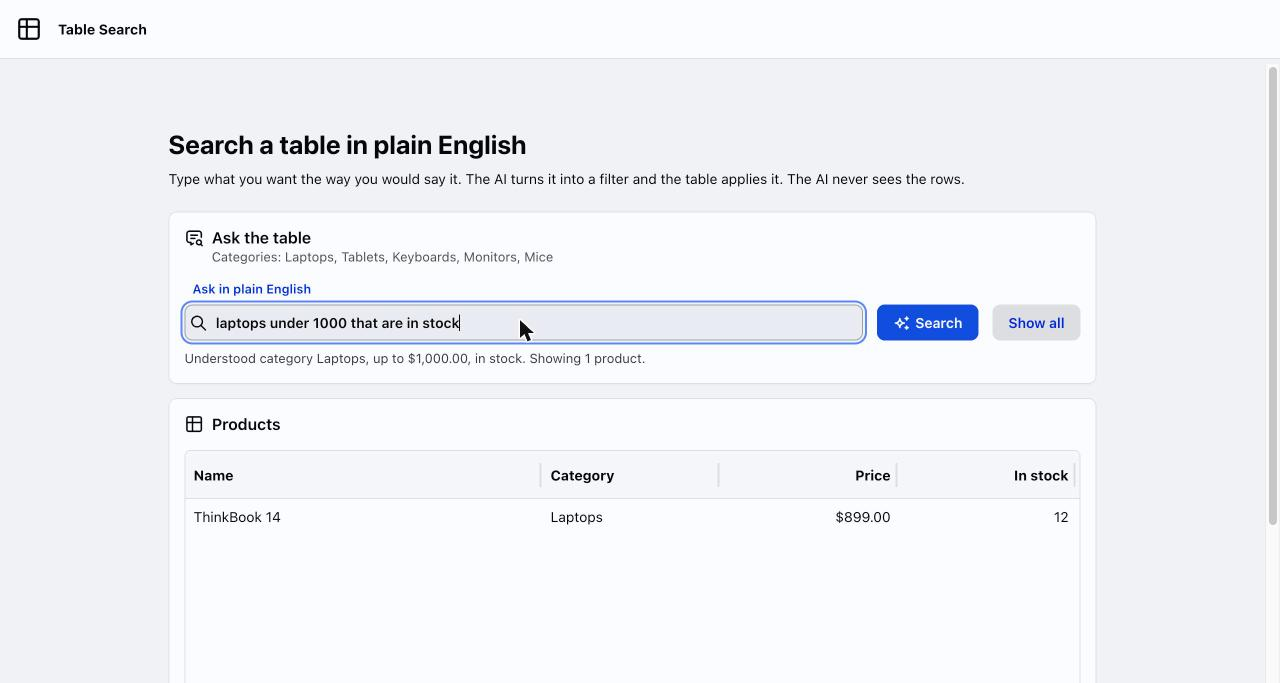
Your users know what they want from a table. They just don't think in dropdowns and price fields. They think "laptops under 1000 that are in stock," and the filter form makes them translate that into five separate controls.
Natural language search for a Java table lets them type that sentence instead. The safe way to build it keeps the model away from your data: it only turns the sentence into a small typed filter, and plain Java applies that filter to the table. This post builds the flow with Spring AI and a webforJ Table.
The complete project, Table Search, is published on GitHub, so you can view the code and run it with your own Gemini API key. The project is kept up to date with the latest webforJ release, so its framework version can be newer than the one this post was written for.
The problem with filter forms
A product table with six filter controls is a familiar sight. A category dropdown, two price fields, a stock checkbox, a name box, and a reset button. Every new column adds another control, and users still can't say what they want in the way they think it. They think "cheap laptops that are in stock."
A search box that accepts that sentence is a real improvement, and it is cheap to build now. The risk is in how you build it. The tempting version sends the sentence to a model, asks for SQL or a Java expression, and runs the answer. That is an injection hole with a friendly face. I'd never ship it.
The version worth shipping keeps the model on a short leash. It fills in a fixed set of fields, and your code owns everything that happens next.
The idea: fill a filter, not a query
The flow has four steps:
- The user types a sentence into a text field.
- A Spring service sends it to the model and asks for a
ProductQueryobject back. - Spring AI parses the reply into that record.
- Your code turns the record into a
Predicateand hands it to the table's repository.
The model can only choose values for fields you declared. It can't invent a new field, add a clause, or reach another table. If it returns nonsense, you get a filter that matches nothing or everything, which is a bad search result, not a security incident.
This also keeps the table logic honest. The Filtering page shows the webforJ model: filtering belongs to the repository, not the table. The same table works whether the filter came from a text box, a dropdown, or a sentence.
Define the filter
Start with the shape of what the model may return. A Java record is enough, and every field is optional because most sentences mention only one or two things.
public record ProductQuery(
    String category,
    String nameContains,
    BigDecimal minPrice,
    BigDecimal maxPrice,
    Boolean inStock) {
}
Keep this small. Each field is a promise that your filter code handles it, and each one is more surface for the model to get wrong. If your table has twenty columns, start with the three people actually search by.
Turn a sentence into a typed filter
Spring AI's ChatClient can convert a reply into a Java type with .entity(...). The structured output documentation describes the mechanism: it adds format instructions derived from your class to the prompt and converts the model's reply into that class.
@Service
public class QueryParser {
  private final ChatClient chatClient;

  public QueryParser(ChatClient.Builder builder, ProductCatalog catalog) {
    this.chatClient = builder
        .defaultSystem("""
            Turn the user's search request into a product filter.
            Set only the fields the request mentions and leave the rest null.
            Category must be one of: %s.
            Prices are plain numbers without a currency symbol."""
            .formatted(String.join(", ", catalog.categories())))
        .build();
  }

  @Async
  public CompletableFuture<ProductQuery> parse(String text) {
    try {
      return CompletableFuture.completedFuture(
          chatClient.prompt().user(text).call().entity(ProductQuery.class));
    } catch (RuntimeException ex) {
      return CompletableFuture.failedFuture(ex);
    }
  }
}
Three details matter here.
A model call takes seconds, so parse must not block the UI. Spring's @Async runs it on a worker thread and hands back a CompletableFuture at once. Add @EnableAsync to the app class to switch it on. Returning a failed future instead of throwing keeps errors on the same path as results.
The category list comes from your own data, not from the model's imagination. Listing the real values in the system prompt steers "notebooks" toward "Laptops" when that is what your catalog calls them. It also gives you something to check against later.
The instruction "leave the rest null" is what makes the filter composable. Without it, models tend to fill every field with a plausible guess, and "show me keyboards" turns into keyboards under some invented price.
Apply the filter to the table
Now the part with no AI in it. Convert the record into a Predicate<Product>, one clause per field that is present.
public final class Filters {
  private Filters() {
  }

  public static Predicate<Product> from(ProductQuery q) {
    Predicate<Product> filter = p -> true;
    if (q.category() != null) {
      filter = filter.and(p -> p.category().equalsIgnoreCase(q.category()));
    }
    if (q.nameContains() != null) {
      String part = q.nameContains().toLowerCase(Locale.ROOT);
      filter = filter.and(p -> p.name().toLowerCase(Locale.ROOT).contains(part));
    }
    if (q.minPrice() != null) {
      filter = filter.and(p -> p.price().compareTo(q.minPrice()) >= 0);
    }
    if (q.maxPrice() != null) {
      filter = filter.and(p -> p.price().compareTo(q.maxPrice()) <= 0);
    }
    if (q.inStock() != null) {
      filter = filter.and(p -> (p.stock() > 0) == q.inStock());
    }
    return filter;
  }
}
Two details keep it honest. inStock is checked both ways, so "out of stock" filters too instead of being dropped. Locale.ROOT keeps the name match the same on every server, because a default locale such as Turkish lowercases I to a dotless ı.
This is the same pattern the Querying data page shows for dynamic filtering with Predicate.and. It is ordinary Java, so a plain JUnit test covers it without a model, a network, or a key. That is the real payoff of the typed-filter design: the only non-deterministic piece is one method, parse, and everything after it is testable.
Wire it into a webforJ view
The view holds a text field, a Search button, and the table. The table reads from a CollectionRepository built from the catalog:
repository = new CollectionRepository<>(catalog.all());

table.setRepository(repository);
table.addColumn("name", Product::name).setLabel("Name").setFlex(2f).setMinWidth(120f);
table.addColumn("category", Product::category).setLabel("Category").setFlex(1f).setMinWidth(96f);
table.addColumn("price", p -> price.format(p.price())).setLabel("Price")
    .setAlignment(Column.Alignment.RIGHT).setFlex(1f).setMinWidth(88f);
table.addColumn("stock", Product::stock).setLabel("In stock")
    .setAlignment(Column.Alignment.RIGHT).setFlex(1f).setMinWidth(72f);
Give the table a height. In a column layout a Table without one collapses and shows no rows. The app sets it in its stylesheet, so it scales with the window:
.tablesearch dwc-table {
  height: clamp(18rem, 55vh, 34rem);
}
Pressing Enter or clicking Search calls runSearch. It disables the button, asks the parser, and waits for the reply without blocking the page:
int id = ++searchId;
search.setEnabled(false);
understood.setText("Reading your search...");
// The reply arrives on a Spring worker thread, so capture this session's Environment here.
Environment env = Environment.getCurrent();
parser.parse(text)
    .orTimeout(TIMEOUT_SECONDS, TimeUnit.SECONDS)
    .whenComplete((query, error) -> Environment.runLater(env, () -> {
      if (id != searchId) {
        return;
      }
      search.setEnabled(true);
      if (error != null || query == null) {
        showAll("Could not read that search. Try rephrasing it.");
        Toast.show("Could not read that search. Try rephrasing it.", Theme.DANGER);
        return;
      }
      apply(query);
    }));
The reply arrives on the worker thread that ran parse. webforJ requires all UI operations to run on the Environment thread, so the result comes back through Environment.runLater, as the asynchronous updates page describes.
The view reads Environment.getCurrent() while it is still on the UI thread and passes it to runLater. That way the update always reaches the session that started the search, whichever worker thread finishes the call.
searchId goes up with every search and every reset, so a slow reply that arrives after the user has moved on is dropped instead of overwriting newer results. orTimeout makes sure the button comes back even if the model never answers.
When the reply is good, apply sets the filter and commits:
repository.setBaseFilter(Filters.from(query));
repository.commit();
The split also pays off in tests. Mock QueryParser to return CompletableFuture.completedFuture(...), and the whole search runs on the test thread with no waiting.
When the model gets it wrong
Models misread requests. Plan for it in code, not in the prompt.
Unknown category. If the model returns a category that isn't in your list, the predicate matches nothing and the table goes empty. Check against catalog.categories() before applying and show a message instead. An empty table with no explanation looks like a bug.
Currency and units. "Under 1k" and "under a thousand dollars" should both end as maxPrice = 1000. Tell the prompt what unit prices use, and test a few phrasings. When you find one that fails, add it to a test list so it stays fixed.
Empty filter. A sentence like "hello" produces a record with every field null, which matches every row. That is a reasonable result, but consider telling the user nothing was recognized.
Cost and latency. Each search is a paid model call. If users search constantly, keep the plain text box as a fast path for simple keyword searches and send only sentences that look like questions to the model. The webforJ filtering model makes this easy because both paths end at the same setBaseFilter() call.
Show users what the model understood. Rendering the parsed filter as a short line over the table ("category laptops, max price 1000, in stock") lets them correct a misread in one look and builds trust faster than any prompt tweak. The app does this in the line under the search box, together with the number of matches.
Talk to your data in a database
CollectionRepository filters Java objects in memory, which suits a few thousand rows. Real tables usually sit in a database or behind an API, and loading everything into memory stops working.
The typed filter carries over almost unchanged. webforJ repositories are generic over the filter type, so ProductQuery can be the filter itself. A DelegatingRepository receives it in its criteria, and your code turns the record into a WHERE clause or request parameters. The Querying data and Custom data sources pages cover that shape, and the Spring Data JPA page covers filtering through specifications.
This is why I prefer the record over any "model writes the query" approach. Your database only ever sees queries your own code built, with bound parameters. The model's whole influence is five optional fields.
My rule of thumb
Use AI for the translation, not the execution. The sentence-to-filter step is where a model earns its cost, because people phrase things in endless ways and a form can't keep up. Everything before it (the field list) and after it (the predicate, the repository, the table) should be code you can read and test.
webforJ suits this split because the UI, the repository and the Spring service live in one Java codebase. The record, the parser, the predicate builder and the view are four small classes in one project, with no separate API layer between the search box and the table.
Next step
Take an existing Table with a repository, add a TextField and the classes in this post, and start with a single field such as category. Add fields one at a time and write a test for each phrasing that breaks. If you don't have a project yet, generate one with startforJ or follow the getting started guide.
Frequently asked questions
How do I build natural language search for a table in Java?
Ask a model for a typed filter object instead of a query. With Spring AI, ChatClient and .entity(YourRecord.class) return that object, and you convert it to a Predicate and pass it to the repository with setBaseFilter() followed by commit().
Can a chat model power grid search without database access?
Yes. The model only receives the user's sentence and the list of allowed values you put in the prompt. It never receives rows and never runs a query, so your data stays in your app and the table stays the only thing that reads it.
Is it safe to let users type free text into a model-backed grid search?
It is safe when the model's output is limited to a fixed record of optional fields. Your own code builds the predicate or the parameterized query from those fields, so nothing the model writes is ever executed.
Entwickelst du etwas mit webforJ?
Sprechen Sie mit dem Team über Ihr Projekt, eine Migration oder ob webforJ das Richtige für Sie ist.
Weiterlesen
 Advanced RAG with Spring AI: test each step before you add itAdvanced RAG in Java with Spring AI and webforJ: measure retrieval first, then add query rewriting, hybrid search and reranking only where they move the numbers.
 AI form filling in Java: Spring AI structured outputBuild an AI form filler in Java with Spring AI and webforJ. Turn pasted text or an uploaded file into a typed bean, load it with BindingContext, and validate before saving.
 Spring AI RAG web UI: chat with your documents in JavaBuild a Spring AI RAG web UI in pure Java with webforJ: upload documents, index them in a vector store, and stream answers with their sources into the page.
