AI form filling in Java: Spring AI structured output


To fill a form with AI in Java, let the user paste free text or upload a file, ask Spring AI for a typed bean with ChatClient and .entity(...), and load that bean into a webforJ form with BindingContext.read. The same Jakarta validation rules that guard manual entry then run on what the model produced, and the user reviews and edits the fields before anything is saved.
This post builds that flow end to end in a webforJ view. The model proposes values, webforJ validates them, and the person stays in control. The complete app, SmartForm, is on GitHub and runs with your own Gemini API key.
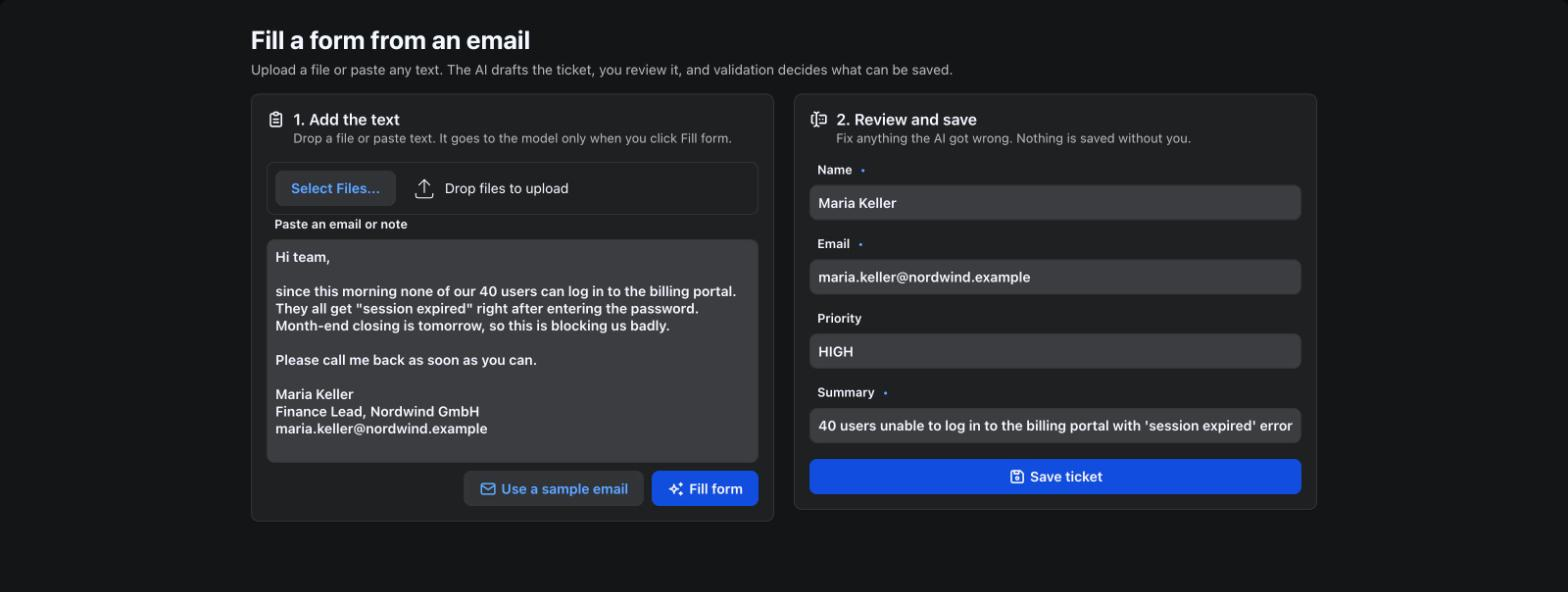
How does an AI form filler work?
The flow has five steps:
- The user pastes an email into a text area, or uploads a file whose text lands there.
- A Spring service sends the text to the model and asks for a Java object back.
- Spring AI parses the model's JSON reply into that object.
- The view loads the object into the form through a
BindingContextand runs validation. - The user fixes anything wrong and saves.
The model never writes to your database and never skips validation. It only drafts the form, and the form's normal save path decides what is accepted.
webforJ fits this well because the form is already bound to a bean. Data binding gives you the load step, the validation step and the error display without any AI-specific code. Spring AI gives you the structured output. If you are new to wiring a model into a webforJ app, add AI to a Java app covers the basics.
What should the target bean look like?
Use the same bean the form already binds to. Put your Jakarta constraints on it, because they apply both to manual typing and to AI-filled values.
public class SupportTicket {
  @NotBlank(message = "Name is required")
  private String name;

  @Email(message = "Enter a valid email address")
  @NotBlank(message = "Email is required")
  private String email;

  @Pattern(regexp = "LOW|NORMAL|HIGH", message = "Priority must be LOW, NORMAL or HIGH")
  private String priority;

  @Size(max = 200, message = "Keep the summary under 200 characters")
  private String summary;

  // getters and setters
}
Spring AI derives a JSON schema from this class and adds it to the prompt, so field names and types matter. The Spring AI documentation shows the same pattern with a plain record. The webforJ binding examples use classes with getters and setters, so that shape is the natural target for a form.
How do you get structured output?
Inject ChatClient.Builder, set a system prompt once, and call .entity(SupportTicket.class) at the end of the request chain.
@Service
public class TicketExtractor {
  private final ChatClient chatClient;

  public TicketExtractor(ChatClient.Builder builder) {
    this.chatClient = builder
        .defaultSystem("""
            Extract support ticket fields from the user's text.
            Leave a field empty if the text does not state it.
            Priority is LOW, NORMAL or HIGH.""")
        .build();
  }

  @Async
  public CompletableFuture<SupportTicket> extract(String text) {
    return CompletableFuture.completedFuture(
        chatClient.prompt().user(text).call().entity(SupportTicket.class));
  }
}
.entity(...) appends format instructions to the prompt, then converts the reply into the target class. The system prompt tells the model what to do when information is missing, which keeps it from inventing a priority or an email address.
The call is blocking and can take seconds. @Async moves it off the request thread, so enable it once with @EnableAsync on your Spring Boot app class. The background jobs guide shows the same pattern for any long-running service.
How do you fill the form?
Create the BindingContext with BindingContext.of(this, SupportTicket.class, true). It matches the view's fields to bean properties by name, and the true turns on Jakarta validation. Buttons are skipped, but every other input field must match a property. Mark the paste box and the upload with @BindingExclude because they are not part of the ticket.
After the model replies, call context.read(ticket) to put the values into the fields, then context.validate() to show any violations right away.
@Route("/")
public class TicketView extends Composite<FlexLayout> {
  @BindingExclude
  private final TextArea pasted = new TextArea("Paste an email or note");
  @BindingExclude
  private final Upload upload = new Upload();
  private final Button fill = new Button("Fill form", ButtonTheme.PRIMARY);
  private final Div thinking = new Div();
  private final TextField name = new TextField("Name");
  private final TextField email = new TextField("Email");
  private final TextField priority = new TextField("Priority");
  private final TextField summary = new TextField("Summary");
  private final Button save = new Button("Save ticket", ButtonTheme.PRIMARY);
  private final BindingContext<SupportTicket> context =
      BindingContext.of(this, SupportTicket.class, true);
  private final TicketExtractor extractor;

  public TicketView(TicketExtractor extractor) {
    this.extractor = extractor;
    thinking.add(new Spinner(SpinnerExpanse.SMALL), new Span("Reading the text..."));
    thinking.setVisible(false);
    getBoundComponent().setDirection(FlexDirection.COLUMN);
    getBoundComponent().add(upload, pasted, fill, thinking, name, email, priority, summary, save);
    context.read(new SupportTicket());

    fill.onClick(e -> fillFromText());
    save.onClick(e -> {
      SupportTicket ticket = new SupportTicket();
      if (context.write(ticket).isValid()) {
        // A real app would persist the ticket here.
        Toast.show("Ticket from " + ticket.getName() + " saved", Theme.SUCCESS);
        context.read(new SupportTicket());
        pasted.setValue("");
      }
    });
  }
}
Spring injects TicketExtractor into the route through its constructor, as the Spring routing guide describes. The save button uses context.write(ticket), which validates and copies the field values into a new bean. This is the same call you would use for a form with no AI at all.
Validation runs on AI output the same way it runs on typed input. If the model returns priority as URGENT, the @Pattern rule fails and the field shows your message. See Jakarta validation for the supported constraints and message handling.
How do you read an uploaded file?
Users often have the text in a file rather than on the clipboard. The webforJ Upload component takes the file, and Spring AI's TikaDocumentReader from the spring-ai-tika-document-reader artifact reads the text out of PDF, Word, email and plain text files. Configure the upload in the constructor:
upload.setAutoUpload(Upload.AutoUpload.ALWAYS)
    .addFilter("Emails and documents", "*.txt;*.eml;*.md;*.pdf;*.docx");
upload.setVisible(false, Upload.Part.UPLOAD_BUTTON);
upload.onUpload(e -> e.getFiles().forEach(this::readFile));
AutoUpload.ALWAYS sends a file as soon as it is picked or dropped, so the upload button is hidden. Each file then goes to readFile, which puts its text into the paste box:
private void readFile(UploadedFile uploaded) {
  Path folder = null;
  try {
    folder = Files.createTempDirectory("smartform");
    File saved = uploaded.move(folder.resolve(uploaded.getSanitizedClientName()).toString());
    String text = new TikaDocumentReader(new FileSystemResource(saved)).get().stream()
        .map(Document::getText)
        .collect(Collectors.joining("\n"));
    pasted.setInvalid(false);
    pasted.setValue(text.strip());
  } catch (Exception ex) {
    Toast.show("Could not read " + uploaded.getClientName(), Theme.DANGER);
  } finally {
    delete(folder);
  }
}
The file's text goes into the paste box instead of straight to the model. The user sees exactly what will be sent, can remove parts of it, and the model is only called when they click Fill form. delete removes the temporary folder once the text is read. The Java file upload guide covers filters, limits and progress in more depth.
How do you keep the UI responsive?
webforJ components can only be changed on the UI thread. The model call returns on a different thread, so hand the result back with Environment.runLater.
private void fillFromText() {
  String text = pasted.getValue();
  if (text == null || text.isBlank()) {
    showProblem("Paste or upload some text first.");
    return;
  }

  pasted.setInvalid(false);
  fill.setEnabled(false);
  thinking.setVisible(true);
  extractor.extract(text)
      .whenComplete((ticket, error) -> Environment.runLater(() -> {
        fill.setEnabled(true);
        thinking.setVisible(false);
        if (error != null || ticket == null) {
          showProblem("Could not read that text. Fill the form by hand.");
          return;
        }
        context.read(ticket);
        context.validate();
      }));
}

private void showProblem(String message) {
  pasted.setInvalid(true);
  pasted.setInvalidMessage(message);
}
Environment.runLater returns a PendingResult. Called from a background thread it queues the task for the UI thread, and called from the UI thread it runs immediately. The asynchronous updates guide explains the thread model, ordering, and cancellation. Disabling the button while the call runs prevents a second request on the same text, and the spinner shows the user that the model is working.
How do you handle bad output?
Structured output is best effort. Spring AI's documentation states that the model is not guaranteed to return the format you asked for. Plan for three failures.
| Failure | What happens | What to do |
|---|---|---|
| The call fails or times out | The future completes with an exception | Show a message and leave the form for manual entry |
| The reply can't be parsed | .entity(...) throws | Treat it like a failed call |
| The reply parses but breaks a rule | context.validate() marks the fields | The user corrects them before saving |
The earlier code covers the first two with the error branch, which also catches a reply that converts to no ticket at all. The third needs no extra code because the binding reports violations on the fields themselves. Keep the failure message short and give the user a way forward, which here is the ordinary form.
Spring AI also documents that some models wrap JSON in Markdown fences, which breaks parsing, and describes a converter that strips them. If your provider does this, wrap BeanOutputConverter as that page shows and pass it to .entity(...).
Why review before saving?
A model can misread a name, pick the wrong priority, or fill a field from the wrong part of a long email. Loading the draft into editable fields makes every value visible and correctable. Nothing is saved until the user clicks save and context.write passes validation.
Two small choices keep the review honest. Leave fields empty when the text doesn't state them, so a blank is not mistaken for a model answer. And call context.validate() after read, so the user sees required-field and format problems before they reach the save button.
What about sensitive text?
Pasted text goes to whichever model provider you configure. Decide which data you are willing to send, and redact or exclude fields such as account numbers before the call. Keep the API key in Spring configuration or the environment and not in source.
Next step
Clone SmartForm to run the finished app, or start a project with startforJ, add a Spring AI model starter, and bind one existing form to a bean. Then add the extractor and the paste box. The data binding overview shows the binding side in more detail, and form validation in Java covers validation patterns for the fields you bind.
Frequently asked questions
How do I fill a form with AI in Java?
Send the user's text to Spring AI's ChatClient and call .entity(YourBean.class) to get a typed object. Load that object into the form with BindingContext.read. In webforJ the form's validation then runs on the AI-filled values.
Is the output always valid?
No. Spring AI documents that the model isn't guaranteed to return the requested structure. Handle exceptions from the call, and rely on Jakarta validation to catch values that parse but break your rules.
Why use Environment.runLater?
The model call finishes on a background thread, and webforJ components can only be updated on the UI thread. Environment.runLater queues the update so it runs safely there.
Should the AI save the form?
It is safer not to. Load the draft into the form, let the user review it, and save through context.write, which validates first.
Rakennatko jotain webforJ:llä?
Keskustele tiimin kanssa projektistasi, migraatiosta tai siitä, sopiiko webforJ sinulle.
Jatka lukemista
 Build an AI agent in Java that uses your web app like a userBuild an AI agent in Java with Spring AI and webforJ that reads the screen, clicks, types and fills forms in your running app while the user watches each step.
 Spring AI RAG web UI: chat with your documents in JavaBuild a Spring AI RAG web UI in pure Java with webforJ: upload documents, index them in a vector store, and stream answers with their sources into the page.
 AI Java web framework: how webforJ is built for AI workwebforJ is the AI Java web framework: assistants that know its API, an agent in your running app, MCP Apps, agents that use your UI, and browserless tests.
