What's new in version 25.12?


Version 25.12 of webforJ is live! This release brings two new UI components, table enhancements, a built-in translation system, and Kotlin DSL support. See some of the most exciting highlights below, and as always, see the GitHub release overview for a more comprehensive list of changes.
Table column groups and cell renderers
The Table component picks up two major new features in 25.12: column groups for organizing complex headers, and a library of built-in cell renderers that eliminates the need for custom rendering boilerplate.
Column groups
Tables with lots of columns can get hard to read fast. Column groups solve this by letting you organize related columns under shared, multi-level headers. A group label spans across its child columns, and groups can be nested to any depth. The Table automatically renders the correct number of header rows.
Afficher le code
- Java
Setting up groups is clean and declarative with ColumnGroup.of():
ColumnGroup idInfo = ColumnGroup.of("id-info", "ID Info")
  .setPinDirection(PinDirection.LEFT)
  .add("number")
  .add("title");
Groups also play nicely with the rest of the table's feature set, with support for pinning, drag-and-drop column reordering (constrained within groups), hidden columns, and CSS ::part() styling by group ID or nesting depth.
See the Column Groups documentation for nesting, ordering rules, pinning, and CSS styling.
Built-in cell renderers
No more writing custom lodash templates for common patterns. 25.12 ships a comprehensive library of built-in renderers covering text and labels, status indicators, numbers and currency, links and media, avatars, and icon actions.
Afficher le code
- Java
Need to conditionally style cells based on their values? ConditionalRenderer lets you define rules declaratively. You can highlight overdue invoices, color-code server statuses, or flag outlier values without writing rendering logic by hand. And when you need to combine multiple renderers in a single cell, CompositeRenderer stacks them together.
For tables with large datasets, the new setLazyRender(true) option defers cell rendering until rows scroll into view, giving you a noticeable performance boost.
See the Table Rendering documentation for the full renderer catalog, conditional rendering, composites, and custom renderers.
Kotlin DSL
For Kotlin developers, webforJ 25.12 introduces a Kotlin DSL module that brings a declarative, type-safe way to build UIs. The difference speaks for itself:
FlexLayout layout = new FlexLayout();
layout.setDirection(FlexDirection.COLUMN);
layout.setSpacing("10px");

TextField name = new TextField();
name.setLabel("Name");
name.setPlaceholder("Your name");
layout.add(name);

Button submit = new Button("Submit", ButtonTheme.PRIMARY);
submit.onClick(e -> handleSubmit());
layout.add(submit);
flexLayout {
    direction = FlexDirection.COLUMN
    styles["gap"] = "10px"

    textField("Name", placeholder = "Your name")
    button("Submit", ButtonTheme.PRIMARY) {
        onClick { handleSubmit() }
    }
}
Components nest naturally, the compiler catches structural mistakes before runtime, and everything is fully interoperable with your existing Java code. The module is also extensible, so you can add DSL support for a custom component with a single function.
Getting started is lightweight: add two Maven dependencies, configure the Kotlin plugin, and you're writing DSL code alongside your existing Java files. No separate toolchain needed. Alternatively, skip the setup entirely and clone the Kotlin Starter to hit the ground running.
See the Kotlin DSL documentation for setup, usage patterns, and extensibility.
Built-in translation system
Going global with your app just got a lot simpler. webforJ 25.12 ships a built-in translation system that handles the heavy lifting of internationalization. Define your translations in standard Java ResourceBundle property files, and look them up anywhere with the new t() method.
app.title=Mailbox
menu.inbox=Inbox
greeting=Hello {0}, you have {1} new messages
app.title=Postfach
menu.inbox=Posteingang
greeting=Hallo {0}, Sie haben {1} neue Nachrichten
Any component that implements HasTranslation gets instant access to t(), and when paired with LocaleObserver, your entire UI updates live when the language changes:
@Route
public class MainLayout extends Composite<AppLayout>
    implements HasTranslation, LocaleObserver {

  private final AppLayout self = getBoundComponent();
  private AppNavItem inboxItem;
  private AppNavItem outboxItem;

  public MainLayout() {
    inboxItem = new AppNavItem(t("menu.inbox"), InboxView.class, TablerIcon.create("inbox"));
    outboxItem = new AppNavItem(t("menu.outbox"), OutboxView.class, TablerIcon.create("send-2"));

    AppNav appNav = new AppNav();
    appNav.addItem(inboxItem);
    appNav.addItem(outboxItem);

    self.addToDrawer(appNav);
  }

  @Override
  public void onLocaleChange(LocaleEvent event) {
    inboxItem.setText(t("menu.inbox"));
    outboxItem.setText(t("menu.outbox"));
  }
}
Even better, the system now supports automatic browser locale detection. Enable it, configure your supported locales, and webforJ matches the user's browser preferences on startup. A German browser gets a German UI, no manual selection needed.
Need to pull translations from a database or remote API instead of property files? Implement TranslationResolver and plug in any source you want.
See the Translation documentation for setup, custom resolvers, and data binding integration.
New components
This release adds two new components to the webforJ toolkit. Both are designed for common UI patterns, and are available out of the box with full theming, event handling, and accessibility support.
Accordion
First up, the Accordion: a vertically stacked set of collapsible panels that keeps your layouts clean and your users focused. Each panel has a clickable header that toggles its content, and when multiple AccordionPanel components are grouped inside an Accordion group, opening one automatically collapses the others so only one section is visible at a time.
Afficher le code
- Java
Getting started is straightforward. Create your panels, group them, and you're done:
AccordionPanel panel1 = new AccordionPanel("What is webforJ?");
AccordionPanel panel2 = new AccordionPanel("How do grouped panels work?");
AccordionPanel panel3 = new AccordionPanel("Can I have multiple groups?");

Accordion accordion = new Accordion(panel1, panel2, panel3);
Need users to compare content across sections? Enable multiple mode with accordion.setMultiple(true) and any number of panels can stay open at once. You also get openAll() and closeAll() for bulk control. And if you want richer headers with icons, badges, and status indicators, addToHeader() lets you slot in any component alongside the panel label.
See the Accordion documentation for standalone panels, custom icons, nested accordions, and event handling.
Badge
Another new component introduced in 25.12 is the Badge component, which gives you a compact, visually distinct label for surfacing counts, statuses, and short metadata directly in the UI. Think notification dots, "New" tags, version labels, anywhere you need to call attention to a small piece of information at a glance.
Badges come in fourteen themes, seven filled and seven outlined, so you can match the visual weight to the context. Creating one is as simple as:
Badge badge = new Badge("New");

// With a theme
Badge primary = new Badge("Featured", BadgeTheme.SUCCESS);
Badges integrate naturally with other components. Attach one to a Button with its setBadge() method for notification counts, or to a Tab with setSuffixComponent() for inbox-style indicators. They also support slotted icons, nine size options, and custom seed colors via --dwc-badge-seed when the built-in themes don't match your palette.
Afficher le code
- Java
See the Badge documentation for icons, button and tab integration, sizing, and custom colors.
Also in this release
Deprecation of unsupported Webswing bootstrap options
Several methods on WebswingOptions, including setAutoReconnect(), setDisableLogout(), setSyncClipboard(), setJavaCallTimeout(), setPingParams(), and their getters, have been deprecated and marked for removal. The underlying Webswing JavaScript API removed these bootstrap options between v24.2 and v25.x, so they no longer have any effect. If you're using any of them, migrate to the Webswing Admin Console for configuration instead.
See it in action
The built-with-webforJ repository continues to grow with new reference projects. This release adds:
Bookstore
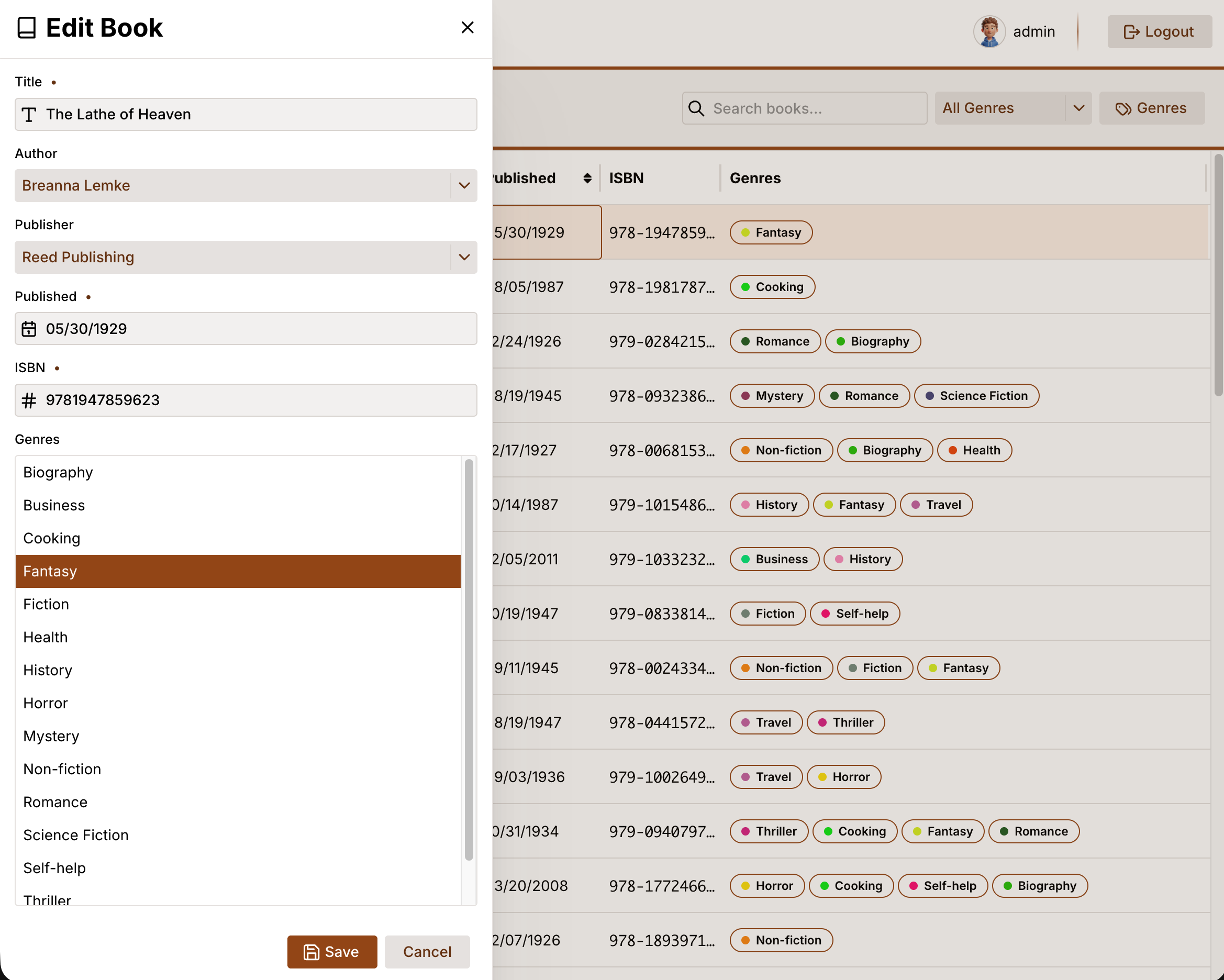
A book inventory management app built with webforJ and Spring Boot. It covers role-based access control, drawer-based CRUD forms with data binding, genre management with custom table cell renderers, and full-text search with SpringDataRepository filtering.
That's 25.12 in a nutshell! For the complete changelog, see the GitHub release.