Summarize PDFs with AI in Java using Spring AI and webforJ


You can summarize PDFs with AI in Java by letting the user upload the file in a webforJ view, extracting the text with Spring AI's Tika reader, and sending that text to a chat model. The summary runs on a background thread, so the page stays responsive while the model works. You will build the whole process in three Java files, with no REST controller and no JavaScript. The complete app, Summarize, is on GitHub and runs with your own Gemini API key.
What you will build
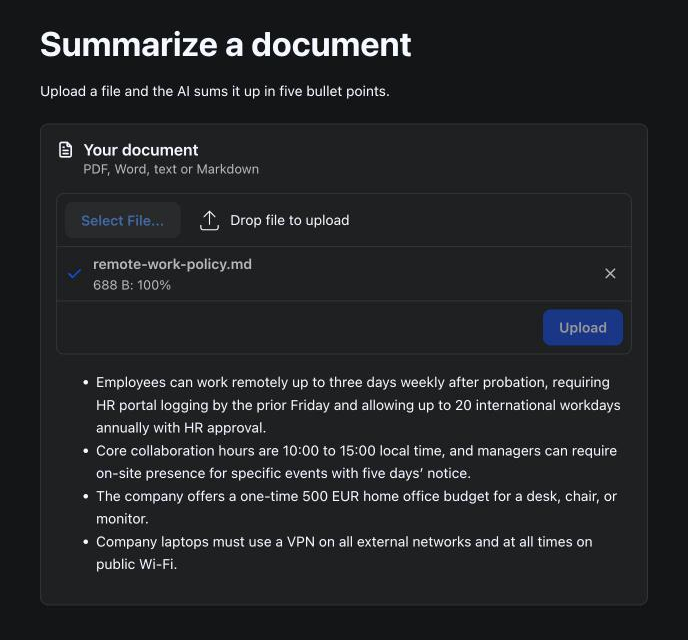
The finished page has one Upload component and one MarkdownViewer. The user picks a PDF, DOCX, or text file, and the viewer shows a short summary of the document. The model answers in markdown, so the viewer renders its bullet points as a list. Each part has one job:
- The
Uploadcomponent receives the file from the browser and hands it to the server. - A Spring service extracts the text and calls the model.
- The view moves the file out of the upload cache and writes the result to the page when the service finishes.
The model call takes seconds. If a click handler waited for it, the UI thread would stall and the page would freeze. The service returns a CompletableFuture instead, and the view uses Environment.runLater() to update components when the result arrives. The background jobs guide covers this pattern in more detail.
Add the dependencies
Add these artifacts to your webforJ Spring Boot project:
spring-ai-client-chat, which provides theChatClienttype.spring-ai-tika-document-reader, which providesTikaDocumentReader. The reader extracts text from formats such as PDF, DOC and DOCX, PPT and PPTX, and HTML.- A chat model starter for your provider. The Summarize app uses
spring-ai-starter-model-google-genaifor Gemini. The starter enables Spring AI's auto-configuration, which creates theChatClient.Builderbean that the service receives in its constructor. Set the API key your provider expects in your configuration before you run the app.
The snippets target webforJ 26.03, Spring Boot 4.1.0, and Spring AI 2.0.0. The Spring AI reference lists the starters for other providers.
Summarize a PDF with AI in Java
The service does the slow work. It reads the file, trims the extracted text to a fixed size, and asks the model for a summary.
@Service
public class SummaryService {
  private static final int MAX_CHARS = 12_000;
  private final ChatClient chatClient;

  public SummaryService(ChatClient.Builder builder) {
    this.chatClient = builder
        .defaultSystem("You summarize documents in at most five bullet points.")
        .build();
  }

  @Async
  public CompletableFuture<String> summarize(Path file) {
    try {
      String text = extract(file);
      String input = text.length() > MAX_CHARS ? text.substring(0, MAX_CHARS) : text;
      String summary = chatClient.prompt()
          .user("Summarize this document:\n\n" + input)
          .call()
          .content();
      return CompletableFuture.completedFuture(summary);
    } catch (RuntimeException ex) {
      return CompletableFuture.failedFuture(ex);
    } finally {
      file.toFile().delete();
    }
  }

  private String extract(Path file) {
    List<Document> parts = new TikaDocumentReader(new FileSystemResource(file)).get();
    return parts.stream().map(Document::getText).collect(Collectors.joining("\n"));
  }
}
A few details in this class matter:
- The constructor sets the system prompt once with
defaultSystem. Each call only sends the document text and the instruction to summarize it. TikaDocumentReaderreturns a list ofDocumentobjects. The method joins their text into one string before it trims the result.MAX_CHARSis a plain cap that this post chose. It does not come from the model. Text past the cap is never sent, so the summary covers only the start of a long document.- The
finallyblock deletes the uploaded file. The summary no longer needs it once the method returns. - A failure becomes a failed
CompletableFuture, so the view can show the error to the user instead of leaving the page in the "Summarizing" state.
Upload file for AI summary
The view owns the Upload component and the result viewer. The upload is set up for one file at a time, because each file gets one summary.
@Route("/summarize")
public class SummarizeView extends Composite<FlexLayout> {
  private final SummaryService summaries;
  private final Path uploads;
  private final MarkdownViewer result = new MarkdownViewer("Upload a document to see its summary.");

  public SummarizeView(SummaryService summaries) {
    this.summaries = summaries;
    this.uploads = createUploadFolder();

    Upload upload = new Upload();
    upload.setSelectionMode(Upload.SelectionMode.SINGLE);
    upload.setAutoUpload(Upload.AutoUpload.ALWAYS);
    upload.addFilter("Documents", "*.pdf;*.docx;*.txt;*.md");
    upload.onUpload(e -> summarize(e.getFile()));

    getBoundComponent().add(upload, result);
  }

  private void summarize(UploadedFile uploaded) {
    Path target = uploads.resolve(UUID.randomUUID() + "-" + uploaded.getSanitizedClientName());
    try {
      File saved = uploaded.move(target.toString());
      result.setText("Summarizing " + uploaded.getClientName() + "...");
      summaries.summarize(saved.toPath()).whenComplete((summary, error) ->
          Environment.runLater(() -> showResult(summary, error)));
    } catch (IOException ex) {
      Toast.show("Could not read " + uploaded.getClientName(), Theme.DANGER);
    }
  }

  private void showResult(String summary, Throwable error) {
    if (error != null) {
      // The async proxy can wrap the failure, so report the underlying cause.
      Throwable cause = error instanceof CompletionException && error.getCause() != null
          ? error.getCause() : error;
      result.setText("Could not summarize this document.");
      String reason = cause.getMessage() != null ? cause.getMessage() : "unknown error";
      Toast.show("Summary failed: " + reason, Theme.DANGER);
    } else {
      result.setText(summary);
    }
  }

  private static Path createUploadFolder() {
    try {
      return Files.createTempDirectory("summaries");
    } catch (IOException ex) {
      throw new UncheckedIOException(ex);
    }
  }
}
The upload settings do most of the work:
SINGLElimits the picker to one file.ALWAYSstarts the transfer as soon as the file is picked or dropped, so the page has no Upload button to click.addFilterlimits what the file picker shows. It does not check what the server receives.
The onUpload listener fires when the file has reached the server. At that point, move() moves the file from the upload cache to a path you choose. The target name combines a random UUID with the sanitized client name, so two uploads with the same name do not overwrite each other.
The callback passed to whenComplete runs on the background thread that finished the summary. Components must change on the UI thread, so the result update is wrapped in Environment.runLater(). setText on a MarkdownViewer replaces its content, so the summary or the failure message takes the place of the "Summarizing" text. The Toast messages report a failed upload or a failed summary. A failure can arrive wrapped in a CompletionException, so showResult reports the cause's message instead of the wrapper's.
Enable async and run the app
The startup class turns on Spring's async support and registers the view package with webforJ.
@SpringBootApplication
@EnableAsync
@Routify(packages = { "com.example.summary" })
public class Application {

  public static void main(String[] args) {
    SpringApplication.run(Application.class, args);
  }
}
@EnableAsync activates the detection of @Async methods. Without it, summarize runs on the calling thread, and the page waits for the model again. Start the app and open /summarize in your browser, then pick a document.
Limits to plan for
This example is a starting point, so check these before you ship it:
- Filters only guide the picker. The example does not check the file type on the server. Add that check before you accept files from users you do not know.
- The server-side
webforj.fileUpload.maxSizeproperty applies as a hard ceiling on top of any client-side limit. Set it to the largest file your app should accept. - The reader extracts the text layer of a document. This post does not add OCR, so a scanned page with no text will produce little or no summary.
- Each summary is one model call. The cost and the wait grow with the number of documents, so plan the rate of uploads for your provider.
Next step
Clone Summarize to run the finished app. To build it into your own project, start from startforJ, add the three classes to a package, and add the dependencies from the first section. The Upload component guide lists the picker, filter, and auto upload options if you want the page to behave differently. The getting started guide covers the project layout.
Frequently asked questions
Can Spring AI summarize a PDF in Java?
Yes. TikaDocumentReader extracts the text from a PDF file, and a ChatClient sends that text to the model with a summary instruction. The service in this post does both steps in one method.
How do I summarize a long document with an LLM?
Split the extracted text into chunks that fit the model's input, summarize each chunk, and then summarize the chunk summaries. The MAX_CHARS cap in this post skips that step, so it suits short documents only.
Why does the summary run on a background thread?
A model call can take several seconds, and running it on the UI thread would freeze the page until the answer arrives. The @Async annotation moves the call to a background thread. Environment.runLater() then returns the result to the UI thread.
Does the Upload component check file types on the server?
No. The filters only limit what the file picker shows, so the server must check the file type and size before it stores or parses the file.
Which file types can the Tika reader handle?
The reader's documentation names PDF, DOC and DOCX, PPT and PPTX, and HTML as examples. The Apache Tika formats page lists every supported format.
Bouw je iets met webforJ?
Bespreek je project, migratie of de geschiktheid van webforJ met het team.
Verder lezen
 Java UI testing without a browser: the webforJ TestBed guideRun Java UI testing without a browser in webforJ. The TestBed runs views in plain JUnit, with no server, and covers forms, dialogs, routes, and Spring.
 AI form filling in Java: Spring AI structured outputBuild an AI form filler in Java with Spring AI and webforJ. Turn pasted text or an uploaded file into a typed bean, load it with BindingContext, and validate before saving.
 Spring AI RAG web UI: chat with your documents in JavaBuild a Spring AI RAG web UI in pure Java with webforJ: upload documents, index them in a vector store, and stream answers with their sources into the page.
