Building an Interactive SVG Viewer with webforJ

I was building a demo that needed to display an SVG diagram in a webforJ app, and at first I figured it was a straightforward image-loading job. Drop the file on the page, give it a size, done.
Then the real requirements showed up. The diagram was larger than its viewport, so users needed to zoom and pan around it. Its individual sections also represented meaningful things, so the Java app needed to react when a user clicked one. At that point it wasn't really an image anymore, it was an interactive part of the app.
The behavior was self-contained enough to deserve its own component. That turned into SvgViewer, a webforJ composite that displays trusted SVG markup with built-in zoom and pan, and fires a typed Java event with the ID of any region the user clicks.
Starting with the Java API I wanted to write
Before touching the internals, I sketched what using the component should look like. From the calling view's side, the whole thing is a fluent setup plus a selection listener:
SvgViewer svgViewer = new SvgViewer()
    .setSvgContent(Assets.contentOf("/img/lifecycle-listeners.svg"))
    .setZoomIncrement(0.25);

svgViewer.setSize("600px", "600px");
svgViewer.addSelectionListener(event ->
    openDiagramSection(event.getElementId()));

self.add(svgViewer);
The messy browser bits stay inside the composite. That's exactly the boundary a webforJ Composite is designed to draw.
Bundling the frontend files
The Java side owns state and the public API. Pointer interaction is easier to write in the browser. In webforJ 26.01, both authored frontend files ship with the component through @BundleEntry:
@BundleEntry("svg-viewer/svg-viewer.js")
@BundleEntry("svg-viewer/svg-viewer.css")
public class SvgViewer extends Composite<Div>
    implements HasSize<SvgViewer>, HasStyle<SvgViewer> {

  private final EventDispatcher dispatcher = new EventDispatcher();
  //...
}
Those entries live under src/main/frontend/svg-viewer and the webforJ Maven plugin picks them up automatically. Implementing HasSize and HasStyle also lets callers size and position the composite the same way they would any built-in component, without exposing the internal root Div.
Making SVG regions selectable
Displaying an SVG through an <img> element is fine when you only need to see it. It falls apart when the app needs to identify things inside it. The markup has to be part of the page's DOM, so setSvgContent() writes the string through setHtml() on the container. That means the caller has to trust the source. In this demo the SVG ships with the app and is loaded via Assets.contentOf(). Anything uploaded or supplied externally should be sanitized first.
Not every SVG id is a good selection target either. Definitions, masks, and drawing tools all introduce internal IDs of their own, so the component uses an explicit data-svg-selectable contract:
<g id="111" data-svg-selectable="111">
  <rect x="70" y="80" width="250" height="48" rx="24" />
  <text x="195" y="110">onWillRun Hook</text>
</g>
The attribute value is the app-level identifier. A click anywhere inside a marked group resolves to that group's ID, no matter which nested element the pointer actually hit.
Splitting selection and dragging
Selection and panning look similar from the browser's side, but they have opposite needs. A click is a discrete event Java cares about. A pointer drag is a continuous stream of movement Java has no reason to ever see. Sending every pointermove back to the server would flood the wire for zero gain.
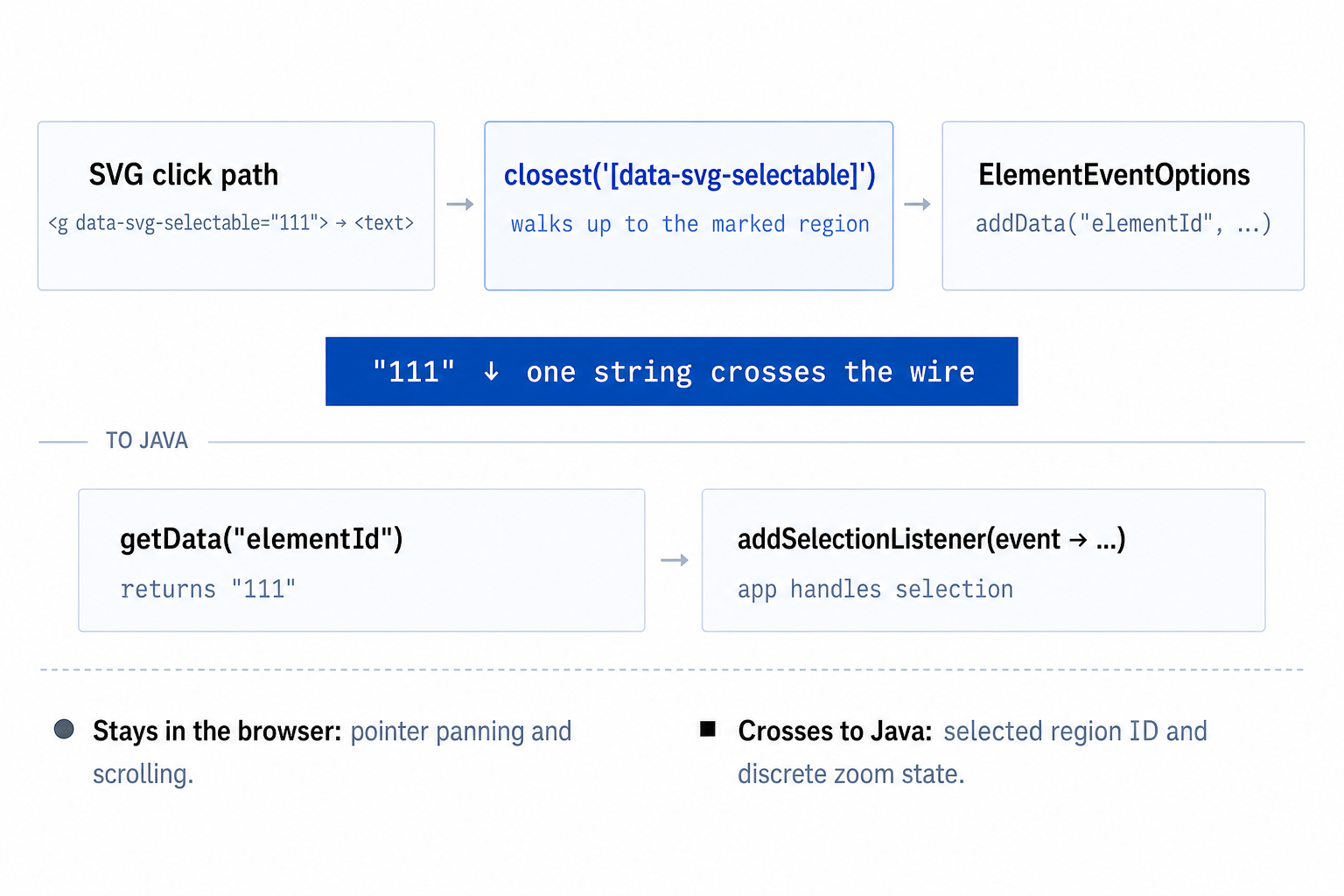
So they live on different sides of the boundary. Selection is a normal listener on the viewport, with ElementEventOptions doing the filtering and value extraction in the browser before anything crosses back to Java:
ElementEventOptions selectionOptions = new ElementEventOptions()
    .addData("elementId",
        "event.target.closest('[data-svg-selectable]')"
            + "?.dataset.svgSelectable || ''")
    .setFilter(
        "Boolean(event.target.closest('[data-svg-selectable]'))");

viewport.addEventListener("click", event -> {
  Object value = event.getData().get("elementId");
  if (value instanceof String elementId && !elementId.isBlank()) {
    dispatcher.dispatchEvent(new SelectionEvent(this, elementId));
  }
}, selectionOptions);
closest() resolves the nearest marked ancestor entirely in the browser, and only the resulting ID travels to the server. EventDispatcher then turns it into a typed SelectionEvent and returns a ListenerRegistration so callers can unsubscribe cleanly when their own lifecycle ends.
Panning is the other half of the story, and it stays in the browser via a bundled svg-pan-viewport custom element. The tricky bit is that this element sits between the user and the selectable SVG regions, so a naive implementation swallows the click that was meant to select something. The fix is to only escalate to a real drag once movement crosses a threshold:
  #onPointerMove = (event) => {
    if (!this.#drag || event.pointerId !== this.#drag.pointerId) return;

    if (!this.#drag.moved) {
      this.#drag.moved = exceedsDragThreshold(
        this.#drag.startX,
        this.#drag.startY,
        event.clientX,
        event.clientY,
      );
      if (this.#drag.moved) {
        this.setPointerCapture(event.pointerId);
        this.classList.add("is-panning");
      }
    }

    if (!this.#drag.moved) return;

    event.preventDefault();
    this.scrollLeft -= event.clientX - this.#drag.lastX;
    this.scrollTop -= event.clientY - this.#drag.lastY;
    this.#drag.lastX = event.clientX;
    this.#drag.lastY = event.clientY;
  };
Capturing on pointerdown is the first thing you'd try, but it retargets the click and loses whatever SVG region was underneath. Waiting for the threshold means a real click still reaches its intended element, and once a real drag starts, capture keeps the gesture alive even if the pointer strays outside the viewport. Because each svg-pan-viewport keeps its own state, multiple viewers on the same page can pan independently without stepping on each other.
Zoom, and looking like it belongs
Zoom stays Java-owned because button clicks are discrete actions. setZoom() clamps its argument into the configured range and applies a CSS transform; NaN or infinite values are rejected before anything reaches the DOM. setZoomMin() and setZoomMax() reject inverted ranges and reclamp the current zoom after a bound changes, so the buttons can never end up in a state they can't undo.
Visually, the component reads webforJ design tokens instead of hardcoded colors:
.svg-viewer {
  border: 1px solid var(--dwc-color-default);
  border-radius: var(--dwc-border-radius);
  overflow: hidden;
  background: var(--dwc-surface-1);
  display: flex;
  flex-direction: column;
}
That means the viewer follows the active theme with no separate light or dark stylesheet. touch-action: none on the pan surface also lets finger gestures behave the same way mouse drags do.
Get the source code
The complete sample includes two viewer instances on the same page, plus Java unit tests, a Bun test for the drag threshold, and Playwright tests for the pieces that cross the Java/JS boundary:
View the SvgViewer source code
Run it in dev mode with:
mvn compile webforj:watch jetty:run
Then open http://localhost:8080.