Advanced RAG with Spring AI: test each step before you add it

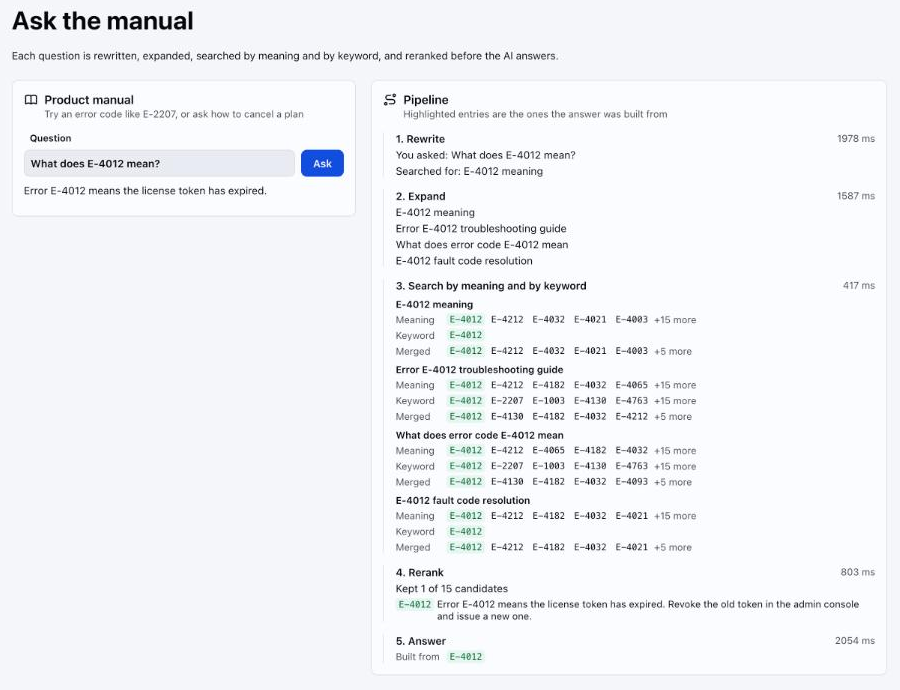
Advanced RAG in Java means fixing retrieval before touching the prompt. Spring AI gives you every stage you need: query rewriting, multi-query expansion, a custom retriever for hybrid search, and a post-processor for reranking, all inside one RetrievalAugmentationAdvisor. Each stage also costs model calls and seconds of waiting, so the real skill is knowing which ones your data needs. This post builds the full pipeline, measures it, and puts it behind a webforJ view that shows what every stage did.
The complete project, Advanced RAG, is published on GitHub, so you can view the code and run it with your own Gemini API key.
Why basic RAG returns the wrong chunks
A basic RAG setup embeds the user's question, asks the vector store for the top few chunks, and pastes them into the prompt. That works in a demo where the question resembles the document text. Real users break it in predictable ways.
- Chatty questions. And what about the second one? has no searchable content on its own.
- Vocabulary mismatch. The user writes cancel and the manual says revoke. Embeddings often bridge that gap, but not every time.
- Exact terms. Error codes, product SKUs and class names are where smaller or older embedding models slip. A keyword index matches them exactly.
- Weak ordering. The right chunk is in the top 20 but not in the top 3, so the model never sees it.
Each failure has a matching stage. Whether your data has the failure is a separate question, and the answer is often no. So the first thing to build is a way to tell.
Measure retrieval before tuning
Write down 20 to 30 real questions, each paired with the id of the chunk that should answer it. Then score retrieval, not the final answer. For every question, record where the right chunk lands in the results. A good answer can hide a bad search when the model fills gaps from its own knowledge, so the rank is the honest number.
record Case(String question, String expectedId) {}

static int rank(List<Document> results, String expectedId) {
  for (int i = 0; i < results.size(); i++) {
    if (results.get(i).getId().equals(expectedId)) {
      return i + 1;
    }
  }
  return 0;
}

static void compare(List<Case> cases, VectorStore vectorStore, DocumentRetriever hybrid) {
  for (Case test : cases) {
    int vector = rank(vectorStore.similaritySearch(
        SearchRequest.builder().query(test.question()).topK(20).build()), test.expectedId());
    int fused = rank(hybrid.retrieve(new Query(test.question())), test.expectedId());
    System.out.printf("%s vector=#%d hybrid=#%d%n", test.question(), vector, fused);
  }
}
Scoring only the search keeps the run cheap. It needs embedding calls for the questions and no chat calls at all.
I ran this against a manual of 200 generated entries built to be hard for embeddings. Every entry is an error code from the same narrow range, E-4000 to E-4999, with near-identical wording such as Error E-4517: the file upload timed out. Restart the job. Twenty questions asked for a random code, for example What should I do about error E-4517? With gemini-embedding-001, plain vector search ranked the right entry first for 20 of 20 questions. Hybrid search also scored 20 of 20, so on this data it added nothing.
That doesn't make hybrid search useless. Your codes may be longer, your chunks noisier, or your embedding model smaller. It does mean the measurement comes before the stage, not after.
Rewrite and expand the query
The cheapest improvement happens before the search. Spring AI ships two pieces for it in spring-ai-rag. RewriteQueryTransformer turns the raw question into a better search query, and MultiQueryExpander produces several differently worded versions of it so one unlucky phrasing doesn't decide the result. The Spring AI RAG reference describes both.
Each one takes a ChatClient.Builder, so each costs one extra model call per question. I'd use a small, fast model for these two stages. They only rephrase text and don't need your best model.
RewriteQueryTransformer rewrite = RewriteQueryTransformer.builder()
    .chatClientBuilder(builder.clone())
    .build();

MultiQueryExpander expander = MultiQueryExpander.builder()
    .chatClientBuilder(builder.clone())
    .numberOfQueries(3)
    .includeOriginal(true)
    .build();
includeOriginal(true) keeps the user's own wording in the mix, which I recommend. Rewrites occasionally drift, and the original query is your safety net.
The trade-off is latency. In one run with gemini-3.5-flash-lite, the rewrite took about a second and the expansion about 0.6 seconds, all before retrieval starts. Add these stages when your test questions are worded differently from your documents and the right chunk ranks low, and check the rank again afterwards.
Hybrid search for advanced RAG in Java
Vector search finds meaning. Keyword search finds exact strings. Hybrid search runs both and merges the two ranked lists. It is worth testing when your corpus is full of identifiers, codes or product names and your measurement shows the embedding model missing them.
Spring AI's VectorStoreDocumentRetriever covers the vector half. For the hybrid half you implement DocumentRetriever, a one-method interface, and fuse the results yourself with reciprocal rank fusion (RRF). RRF scores each document as the sum of 1 / (k + rank) across the lists it appears in, so a document ranked well by both searches beats one ranked first by only one. The method comes from Cormack, Clarke and Buettcher's 2009 paper, and k = 60 is the value that paper used.
KeywordSearch below is a small interface of your own. Back it with whatever your data already lives in, such as PostgreSQL full-text search or a Lucene index.
public class HybridRetriever implements DocumentRetriever {
  private static final int RRF_K = 60;
  private static final int CANDIDATES = 20;
  private static final int TOP = 10;

  private final VectorStore vectorStore;
  private final KeywordSearch keywordSearch;

  public HybridRetriever(VectorStore vectorStore, KeywordSearch keywordSearch) {
    this.vectorStore = vectorStore;
    this.keywordSearch = keywordSearch;
  }

  @Override
  public List<Document> retrieve(Query query) {
    List<Document> semantic = vectorStore.similaritySearch(
        SearchRequest.builder().query(query.text()).topK(CANDIDATES).build());
    List<Document> keyword = keywordSearch.search(query.text(), CANDIDATES);

    Map<String, Double> scores = new LinkedHashMap<>();
    Map<String, Document> byId = new LinkedHashMap<>();
    for (List<Document> ranking : List.of(semantic, keyword)) {
      for (int rank = 0; rank < ranking.size(); rank++) {
        Document doc = ranking.get(rank);
        byId.putIfAbsent(doc.getId(), doc);
        scores.merge(doc.getId(), 1.0 / (RRF_K + rank + 1), Double::sum);
      }
    }

    List<Document> fused = new ArrayList<>();
    for (Document doc : byId.values()) {
      fused.add(doc.mutate().score(scores.get(doc.getId())).build());
    }
    fused.sort(Comparator.comparingDouble(Document::getScore).reversed());
    return fused.size() > TOP ? fused.subList(0, TOP) : fused;
  }
}
Three details matter here. Both searches must give the same chunk the same document id, otherwise RRF counts one chunk twice as two different documents. RRF only uses ranks, never raw scores, which is exactly why it works across systems whose scores can't be compared. A cosine similarity and a BM25 score live on different scales.
The third detail is easy to miss. After retrieval, the advisor merges the results of all queries with Spring AI's default ConcatenationDocumentJoiner, which sorts documents by Document.getScore(). If the retriever only reorders the list, the joiner sorts it back by vector similarity and keyword-only hits sink to the bottom. Writing the fused score onto each document with mutate().score(...) keeps the fusion alive through the join.
A weak keyword index can also add noise. A naive word match finds every chunk that contains error, and those chunks then take up places in the fused list. The retriever keeps the top ten per query, and cutting that down further is the next stage's job.
Rerank before the model sees anything
Retrieval is built for recall. It casts a wide net quickly. Reranking is built for precision, and it looks at the question and each candidate together, which a vector comparison can't do.
Spring AI models this stage as a DocumentPostProcessor, which receives the Query and the retrieved documents and returns the documents to keep. The advisor runs post-processors after retrieval and joining. You can plug in a dedicated reranking model through any HTTP client. For a self-contained version, ask your chat model to order the candidates:
public class LlmReranker implements DocumentPostProcessor {
  private final ChatClient chat;
  private final int keep;

  public LlmReranker(ChatClient.Builder builder, int keep) {
    this.chat = builder.build();
    this.keep = keep;
  }

  @Override
  public List<Document> process(Query query, List<Document> documents) {
    if (documents.size() <= keep) {
      return documents;
    }
    StringBuilder passages = new StringBuilder();
    for (int i = 0; i < documents.size(); i++) {
      passages.append("[").append(i).append("] ")
          .append(documents.get(i).getText()).append("\n\n");
    }

    String reply = chat.prompt()
        .system("""
            Rank the passages by how directly they answer the question.
            Reply with the passage numbers only, best first, separated by commas.
            """)
        .user("Question: " + query.text() + "\n\nPassages:\n" + passages)
        .call()
        .content();

    List<Document> ranked = new ArrayList<>();
    for (String token : String.valueOf(reply).split("[^0-9]+")) {
      if (token.isEmpty() || token.length() > 4) {
        continue;
      }
      int index = Integer.parseInt(token);
      if (index < documents.size() && !ranked.contains(documents.get(index))) {
        ranked.add(documents.get(index));
      }
    }
    if (ranked.isEmpty()) {
      return documents.subList(0, keep);
    }
    return ranked.size() > keep ? ranked.subList(0, keep) : ranked;
  }
}
The parsing is deliberately forgiving. Models add stray words, repeat numbers or invent an index, so the loop ignores anything that isn't a valid, unseen passage number, and skips digit runs too long to be an index before Integer.parseInt can overflow. keep is a maximum, not a promise. In one run the model listed a single passage out of 15 candidates, so the answer was built from one chunk. When the reply holds no usable number at all, or no reply comes back, the method keeps the first keep candidates in retrieval order instead of sending the model an empty context.
Sending 20 passages to a model for ranking is not free. Keep the candidate count modest and the passages short. A purpose-built reranker model is cheaper and faster per call than a general chat model, so treat this version as a starting point you can swap out behind the same interface.
Wire the pipeline together
RetrievalAugmentationAdvisor takes every stage through its builder. The order of the calls doesn't matter, because the advisor always runs the stages in the same sequence: transform, expand, retrieve, join, post-process, augment.
@Configuration
public class RagConfig {

  @Bean
  RetrievalAugmentationAdvisor ragAdvisor(ChatClient.Builder builder, VectorStore vectorStore,
      KeywordSearch keywordSearch) {
    return RetrievalAugmentationAdvisor.builder()
        .queryTransformers(RewriteQueryTransformer.builder()
            .chatClientBuilder(builder.clone())
            .build())
        .queryExpander(MultiQueryExpander.builder()
            .chatClientBuilder(builder.clone())
            .numberOfQueries(3)
            .includeOriginal(true)
            .build())
        .documentRetriever(new HybridRetriever(vectorStore, keywordSearch))
        .documentPostProcessors(new LlmReranker(builder.clone(), 5))
        .build();
  }
}
Because the advisor is a bean, every ChatClient that registers it gets the full pipeline. Count what one question now costs. There are four model calls: the rewrite, the expansion, the rerank, and the answer. Retrieval runs once for each of the four queries, so the pipeline makes eight searches, four by vector and four by keyword, and each vector search embeds its query first.
See what each stage did
A pipeline this long is hard to trust when all you see is the final answer. Each stage is a small interface, so you can wrap it, record what it received and returned, and pass the call on unchanged:
static QueryTransformer recorded(QueryTransformer stage, List<String> log) {
  return query -> {
    Query result = stage.transform(query);
    log.add("Rewrite: " + query.text() + " -> " + result.text());
    return result;
  };
}

static DocumentPostProcessor recorded(DocumentPostProcessor stage, List<String> log) {
  return (query, documents) -> {
    List<Document> kept = stage.process(query, documents);
    log.add("Rerank: kept " + kept.size() + " of " + documents.size());
    return kept;
  };
}
Wrap the expander, the retriever, and the vector store and keyword index inside HybridRetriever the same way, and build the advisor per question instead of once as a bean, so each run gets its own record. Retrieval can run on several threads, one per expanded query, so use a thread-safe list.
In webforJ the record goes straight into the page next to the answer. Each step becomes a row with its time and the chunk ids it returned, and the ids the answer used get highlighted in every step. You can follow one chunk from the vector results through the fusion and the rerank into the answer. When a test question fails, the view shows the stage that lost the right chunk.
Keep the slow pipeline off the UI thread
Four model calls and eight searches per question take seconds. If a click handler in a webforJ view does that work directly, the view is blocked until it finishes. The fix is the pattern from the background jobs guide: annotate the service method with @Async, return a CompletableFuture, and hand the result back to the UI thread with Environment.runLater().
@Service
public class DocsAssistant {
  private final ChatClient chat;

  public DocsAssistant(ChatClient.Builder builder, RetrievalAugmentationAdvisor advisor) {
    this.chat = builder.defaultAdvisors(advisor).build();
  }

  @Async
  public CompletableFuture<String> ask(String question) {
    return CompletableFuture.completedFuture(
        chat.prompt().user(question).call().content());
  }
}
@Async only takes effect once you add @EnableAsync to your Spring Boot app class, as the guide describes. The view calls the service, and the completion callback updates the page:
@Route("/ask")
public class AskView extends Composite<FlexLayout> {
  private final DocsAssistant assistant;
  private final MarkdownViewer answer = new MarkdownViewer();
  private final TextField question = new TextField();
  private final Button ask = new Button("Ask", ButtonTheme.PRIMARY);
  private CompletableFuture<String> current;
  private boolean destroyed;

  public AskView(DocsAssistant assistant) {
    this.assistant = assistant;
    getBoundComponent().setDirection(FlexDirection.COLUMN).add(question, ask, answer);
    ask.onClick(e -> run());
  }

  private void run() {
    ask.setEnabled(false);
    answer.setContent("Searching the documentation...");
    current = assistant.ask(question.getValue());
    current.whenComplete((text, error) -> Environment.runLater(() -> {
      if (destroyed) {
        return;
      }
      answer.setContent(error == null ? text : "The search failed. Try again.");
      ask.setEnabled(true);
    }));
  }

  @Override
  protected void onDestroy() {
    destroyed = true;
    if (current != null && !current.isDone()) {
      current.cancel(true);
    }
    super.onDestroy();
  }
}
The whenComplete callback runs on a background thread, so every component call inside it is wrapped in Environment.runLater(). That rule is explained in Asynchronous Updates. The onDestroy() override cancels the future when the user leaves the view. Cancelling a CompletableFuture doesn't interrupt the thread behind it, so the model calls already in flight still finish. What the cancel does is stop the view from waiting. It also runs the whenComplete callback at once, which is why the destroyed flag is set first, so the callback never touches components that are going away.
The MarkdownViewer renders the model's markdown answer, including lists and code blocks, with one setContent() call. If you'd rather stream the final generation token by token, the same component has append(), auto-scroll and progressive rendering. The retrieval stages still finish before the first token arrives, which is why the placeholder text in the previous snippet matters. A user who sees a progress message waits more patiently than one staring at a frozen page.
All of this is one Spring Boot app. The retrieval pipeline, the service and the view live in the same Java project, and there is no endpoint to design between them. The Spring integration overview covers how webforJ and Spring Boot fit together.
When to skip a stage
Every stage adds latency and model cost. Add one only when your test questions show the failure it fixes, and keep it only if the right chunk ranks higher afterwards.
| Symptom in your test questions | Try |
|---|---|
| Codes, SKUs or class names rank low with vector search | Hybrid search |
| Follow-up questions retrieve nothing useful | CompressionQueryTransformer with the chat history |
| Questions use other words than the documents | Query rewriting, then multi-query expansion |
| Right chunk is retrieved but ranked below the cut | Reranking |
Spring AI's CompressionQueryTransformer folds the conversation history into a single standalone query. That fixes the "what about the second one?" problem better than a plain rewrite.
Every row starts from a symptom, not from the kind of data. Having identifiers in your documents doesn't call for keyword search on its own. In the error-code test earlier in this post, vector search already found every code. Your data decides, and the measurement takes an afternoon.
Next step
Start a project from startforJ or follow Getting started, add the Spring AI RAG dependency and your model starter, and write the test questions before any stage. Run them against plain vector search first. The ranks tell you which section of this post to build next, if any.
Frequently asked questions
What is reranking in RAG and does Spring AI support it?
Reranking reorders the retrieved chunks by how well each one answers the question, then keeps only the best few. Spring AI supports it through the DocumentPostProcessor interface, which the RetrievalAugmentationAdvisor runs after retrieval. You implement the scoring yourself with a chat model or a dedicated reranking model.
How do I do hybrid search for RAG in Java?
Implement Spring AI's DocumentRetriever so it queries both your vector store and a keyword index, then merge the two rankings with reciprocal rank fusion. Make sure both sources use the same document ids. Measure plain vector search first, because a current embedding model may already find your exact terms.
How can I improve RAG accuracy in Java without changing the model?
Work on retrieval first, and measure it. Pair real questions with the chunk that should answer them, record the rank of that chunk, and add rewriting, hybrid search or reranking only where the rank is poor. Keep a stage only if the rank improves.
Rakennatko jotain webforJ:llä?
Keskustele tiimin kanssa projektistasi, migraatiosta tai siitä, sopiiko webforJ sinulle.
Jatka lukemista
 AI form filling in Java: Spring AI structured outputBuild an AI form filler in Java with Spring AI and webforJ. Turn pasted text or an uploaded file into a typed bean, load it with BindingContext, and validate before saving.
 Spring AI RAG web UI: chat with your documents in JavaBuild a Spring AI RAG web UI in pure Java with webforJ: upload documents, index them in a vector store, and stream answers with their sources into the page.
 Summarize PDFs with AI in Java using Spring AI and webforJUpload a PDF in a webforJ view, extract its text with Spring AI and Apache Tika, and show an AI summary in Java. Three classes, no REST layer, no JavaScript.
