Build a Java admin dashboard with webforJ in pure Java

You can build a Java admin dashboard in webforJ without writing HTML, JavaScript, or a REST layer. AppLayout gives you the header and the collapsible drawer, AppNav gives you the menu, each page is a routed Java class, and Card, Table, and GoogleChart fill the page. Access rules are annotations on the view classes.
This guide walks through the pieces of an admin panel in Java in the order you would build them: the shell, the pages, the widgets, the access rules, and the theme. Every snippet is a class you can drop into a webforJ project.
What a Java dashboard framework needs to provide
An admin dashboard is a small set of repeating parts. A Java dashboard framework has to cover all of them, otherwise you end up bolting a JavaScript stack onto the side:
| Part | webforJ building block |
|---|---|
| Shell with header and collapsible sidebar | AppLayout with Toolbar and AppDrawerToggle |
| Menu | AppNav and AppNavItem |
| Pages and URLs | Routes with an outlet pointing at the layout |
| KPI tiles | Card |
| Data grid | Table |
| Charts | GoogleChart |
| Who can see what | Route security annotations |
| Light and dark appearance | @AppTheme |
The UI runs as Java on the server and the browser renders the web components. Your views read from your services directly, so a dashboard page is a class that calls a method and puts the result into a component.
Start the project
Generate a project with startforJ or the Maven archetype command described on the same page. The SideMenu archetype already contains a drawer layout and a routed content area, which is the shape an admin panel needs. The rest of this guide builds the same structure by hand so you can see each part.
Build the shell with AppLayout and AppNav
The shell is a layout route. It extends Composite<AppLayout>, so the layout is the bound component, and every dashboard page renders inside it. The header holds the drawer toggle and the title, and the drawer holds an AppNav.
@Route
public class MainLayout extends Composite<AppLayout> {
  private final AppLayout self = getBoundComponent();

  public MainLayout() {
    Toolbar header = new Toolbar();
    header.addToStart(new AppDrawerToggle());
    header.addToTitle(new H1("Admin"));
    self.addToHeader(header).setHeaderOffscreen(false);

    AppNav nav = new AppNav();
    nav.addItem(new AppNavItem("Overview", OverviewView.class)
        .setPrefixComponent(TablerIcon.create("layout-dashboard")));
    nav.addItem(new AppNavItem("Orders", OrdersView.class)
        .setPrefixComponent(TablerIcon.create("shopping-cart")));
    nav.addItem(new AppNavItem("Users", UsersView.class)
        .setPrefixComponent(TablerIcon.create("users")));

    self.addToDrawer(nav);
    self.setDrawerOpened(true);
  }
}
AppNavItem accepts a view class, so the menu stays in sync with your routes and a renamed path never leaves a dead link. On narrow screens the drawer switches to a popover at a breakpoint you can change with setDrawerBreakpoint, which is how the same dashboard works on a phone.
Add routed views inside the layout
A page joins the shell through the outlet parameter of @Route. The router renders MainLayout first and places the page in its content area. Read more about this in the nested routes guide.
@Route(outlet = MainLayout.class)
@FrameTitle("Overview")
public class OverviewView extends Composite<FlexLayout> {
  // KPI cards, chart, and table go here
}
Each view is a plain class with its own URL. You can deep-link to /orders, use the browser back button, and bookmark a page, none of which needs extra code.
Add KPI cards, a table, and a chart
The overview page combines three widgets. A KPI tile is a Card with the number in the body and the label in the title slot. The data grid is a Table bound to a list. The chart is a GoogleChart that takes rows as a Java list.
public class OverviewView extends Composite<FlexLayout> {
  private final FlexLayout self = getBoundComponent();

  public OverviewView() {
    FlexLayout kpis = new FlexLayout(kpi("Revenue", "$48,210"),
        kpi("Orders", "1,284"), kpi("Active users", "312"));
    kpis.setSpacing("1em");

    GoogleChart chart = new GoogleChart(GoogleChart.Type.LINE);
    List<Object> data = new ArrayList<>();
    data.add(Arrays.asList("Month", "Revenue"));
    data.add(Arrays.asList("May", 31000));
    data.add(Arrays.asList("Jun", 36500));
    data.add(Arrays.asList("Jul", 48210));
    chart.setData(data);
    chart.setOptions(Map.of("title", "Revenue by month", "legend", "none"));

    Table<Order> table = new Table<>();
    table.addColumn("Order", Order::getId);
    table.addColumn("Customer", Order::getCustomer);
    table.addColumn("Total", Order::getTotal);
    table.setItems(List.of(new Order("A-1001", "Northwind", 420.0),
        new Order("A-1002", "Contoso", 1180.5)));

    self.setDirection(FlexDirection.COLUMN);
    self.setSpacing("1.5em");
    self.add(kpis, chart, table);
  }

  private Card kpi(String label, String value) {
    Card card = new Card(new H1(value));
    card.addToTitle(new H3(label));
    return card;
  }
}
Three details are worth knowing.
- The chart lives in a separate module,
webforj-googlecharts, so add that dependency to your POM first. The Google Charts page lists the chart types and the options map. - The chart redraws itself when its data or options change and when the browser window resizes. A collapsing drawer changes the container size without a window resize, so call
chart.redraw()from the drawer open and close listeners. - For real data, swap
setItemsforsetRepositorywith aRepositorybacked by your service. The table then asks for rows as the user scrolls and sorts, so a large orders table doesn't load all at once. See the Table guide for sorting, filtering, and selection.
Protect the admin panel with route security
An admin panel is only useful if the right people see the right pages. webforJ evaluates access on the route, before the view is constructed, so a forbidden page is never built or rendered.
@Route("login")
@AnonymousAccess
public class LoginView extends Composite<Div> { }

@Route(value = "orders", outlet = MainLayout.class)
@PermitAll
public class OrdersView extends Composite<Div> { }

@Route(value = "users", outlet = MainLayout.class)
@RolesAllowed("ADMIN")
public class UsersView extends Composite<Div> { }
@AnonymousAccess opens a route to everyone, @PermitAll requires a signed-in user, and @RolesAllowed requires one of the listed roles. Turn on secure-by-default so that a route without an annotation requires authentication instead of being public:
webforj.security.secure-by-default=true
With Spring Security on the classpath, these annotations work against your existing users and roles. Without Spring, the security architecture guide shows the interfaces to implement. The route security article covers why checking the route is stronger than hiding a menu item, so keep both in mind when you remove the Users entry for non-admins. The menu entry is a courtesy and the annotation is the rule.
Add dark mode and theming
webforJ ships light, dark, and dark-pure themes. To follow the operating system setting, register one theme for each appearance and set the app theme to the reserved value system.
@AppTheme("system")
@AppLightTheme("light")
@AppDarkTheme("dark")
public class Application extends App { }
For a manual switch in the header, change the theme at runtime:
IconButton toggle = new IconButton(TablerIcon.create("moon"));
toggle.onClick(e -> App.setTheme("dark".equals(App.getTheme()) ? "light" : "dark"));
Branding usually means overriding the seed colors of the built-in themes rather than writing a new one. The themes page shows the selectors, and the themes guide walks through a full example.
Where to go from here
The shell, the pages, and the access rules in this guide are the skeleton of any internal tool. From here, add forms with data binding for the create and edit screens, and a Table backed by a repository for your real records. Everything stays in Java, in one project, in one deployment.
Frequently asked questions
Can I build an admin panel in Java without writing JavaScript?
Yes. In webforJ the layout, the navigation, the tables, and the charts are all Java classes. You need CSS only for branding beyond the built-in themes.
Which webforJ component gives me the sidebar layout?
AppLayout provides a fixed header, a collapsible drawer, a footer, and a scrolling content area. Put an AppNav in the drawer for the menu and add an AppDrawerToggle to the header.
How do I restrict a dashboard page to admins?
Annotate the view class with @RolesAllowed("ADMIN"). The router checks the annotation before it builds the view, and users without the role can't reach the view.
Does webforJ have a chart component?
Yes. GoogleChart wraps the Google Charts library and supports bar, line, pie, geo, and other types. You pass rows as a Java list and options as a map.
Building something with webforJ?
Talk to the team about your project, a migration, or whether webforJ fits.
Keep reading
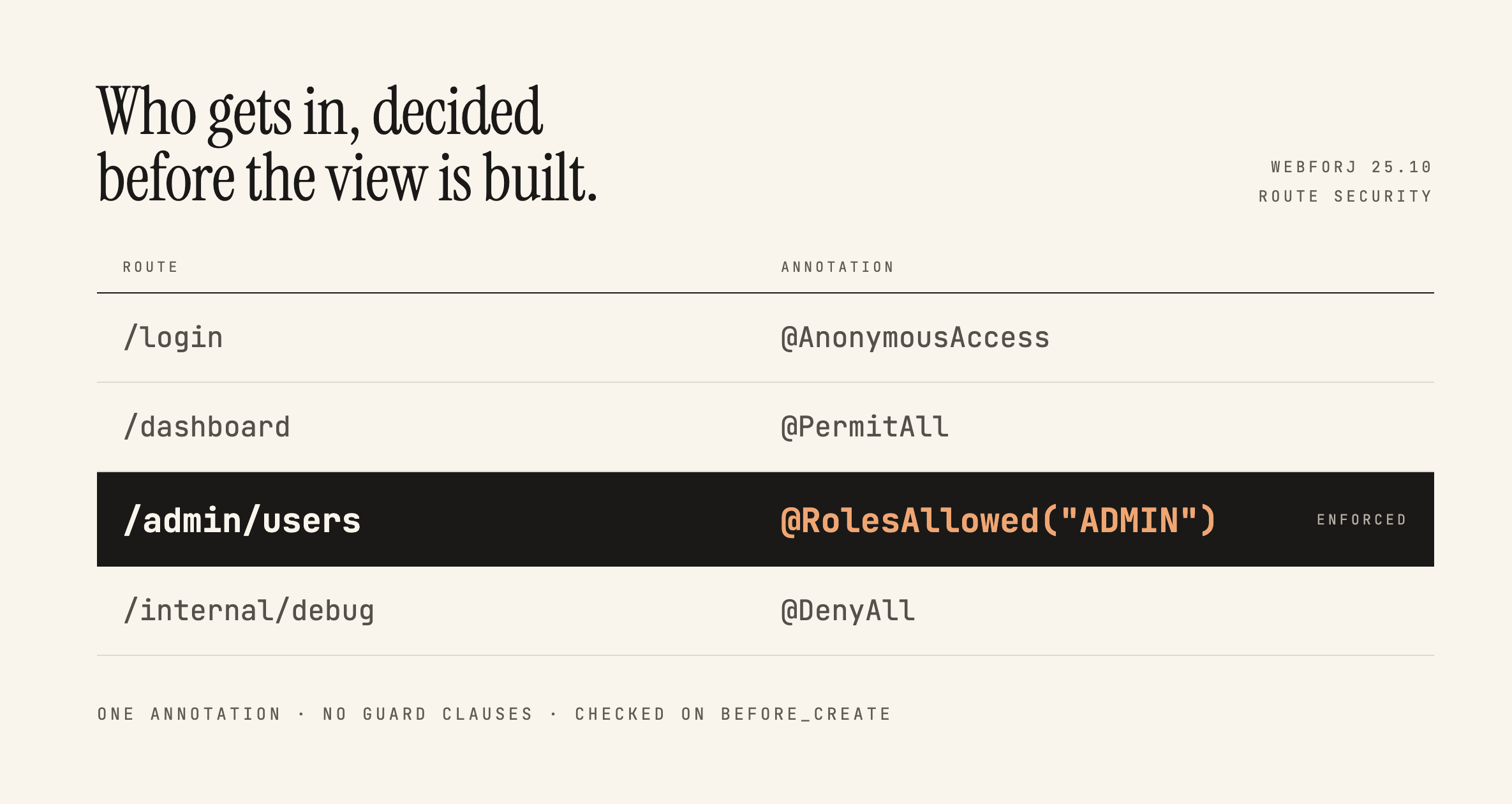 Securing webforJ Routes Before the View ExistsRoute annotations stop people reaching a view. What they don't do is follow you inside it, and that distinction decides where your access checks belong.
 Building a Full-Featured Demo with webforJ and Spring BootA walkthrough of the webforJ Bookstore app, a full-stack inventory manager with live filtering, data binding, custom table renderers, and Spring Security
 Java progressive web app: make a webforJ app installableBuild a Java progressive web app with webforJ. One @AppProfile annotation adds the manifest, icons, and install prompt. Covers testing and offline limits.
