~/webforj/blog $ ls --tag=ai → 36 posts rss

36 posts tagged with "AI"

Artificial intelligence and AI-assisted development with webforJ.

View all tags

Vibe Coding a Java Web App Without Losing Control

· 7 min read
webforJ
Do it all in Java. The full-stack Java framework for business web apps.

cover image

Your developers already describe screens to an AI assistant and judge what comes back. The first version appears fast. Whether it can ship is a separate question, and it is the one that matters when a team starts vibe coding a Java web app the business will depend on.

Left alone, the approach fails in known ways. The assistant guesses at an API, a change breaks a screen nobody touched, or nobody can say what the code does. We built webforJ, the full-stack Java framework for business web apps, so the speed comes with control: the whole app is Java, the assistant reads the real API, and every change gets checked.

Spring Boot MCP server: tools plus a live UI in webforJ

· 11 min read
Hyyan Abo Fakher
Lead Software Architect

cover image

Ask an AI assistant how much a customer owes and a one-line answer is perfect. Ask it for every unpaid invoice due this month, so you can chase the overdue ones, and a paragraph of text stops being useful. You want the invoices in front of you.

A Spring Boot MCP server can give you both. Spring AI runs the MCP server and talks to the AI client, and webforJ adds what Spring AI doesn't: a live view that the client opens inside the conversation, with tools the model can call to change it.

Edit a running Java app with AI in craftforJ

· 7 min read
Matthew Hawkins
Software Developer

cover image

You can edit a running Java app with AI in webforJ by using the craftforJ AI assistant. The assistant works inside the app that is open in your browser. It writes the Java for a change, compiles that Java before you see it, and applies the change to your source once you approve it. You describe the change in plain language, and the assistant works from the live components rather than a guess made from your files.

This post walks through how that loop works. You will turn on the two settings that enable craftforJ, pick a component in the running app, and see what happens when you ask the assistant for a change.

MCP Apps in Java: show a webforJ UI inside AI chat

· 10 min read
Matthew Hawkins
Software Developer

cover image

To build an MCP app in Java with webforJ, add @McpApp to a routed view and an MCP host such as Claude Desktop can open that view inside its conversation, with the same components, services, and state your app already has. The AI can pass input when it opens the view, call actions on it, and receive context from what the person clicks.

An MCP server in Java usually returns text or JSON. With webforJ it can return a live interface instead. You write the view in Java, and the MCP host renders it next to the chat.

AI coding assistant for Java: the webforJ AI plugin

· 10 min read
webforJ
Do it all in Java. The full-stack Java framework for business web apps.

cover image

An AI coding assistant for Java web UIs works best when it is connected to the framework's own knowledge. For webforJ, that is the webforJ AI plugin. One install adds an MCP server and a set of Agent Skills to Claude Code, GitHub Copilot, VS Code, Gemini CLI, Codex, Cursor, and other clients. Your assistant then looks up real class names, scaffolds projects, generates themes and validates CSS tokens instead of guessing.

This post is the hands-on version. It shows why general assistants get Java UI code wrong, what the plugin installs, the commands to run, the prompts to type, and the kind of code that comes back.

AI actions that update a Java UI: open and change webforJ views

· 9 min read
Hyyan Abo Fakher
Lead Software Architect

cover image

You ask an AI assistant to open a screen, and it does. Then you ask for a change, and a second copy of the screen appears under the first, because the assistant only knows how to open things. The view you're looking at never moves.

AI actions that update a Java UI fix that. With webforJ MCP Apps, the AI opens your routed view with typed input, then changes the same live view through actions and an update tool, while your Java code keeps running on the server. This post walks through each piece with code from a working playground app built to exercise all of them.

MCP app in plain Java: no Spring Boot required

· 11 min read
Hyyan Abo Fakher
Lead Software Architect

cover image

Not every Java web app runs on Spring Boot, and adding a framework just to put one screen inside an AI chat would be the biggest change in the project. The good news is that you don't have to.

You can build an MCP app in plain Java without Spring Boot. With webforJ, one servlet initializer assembles the MCP server, a routed view becomes the UI the AI opens, and the person clicks through the same live components they'd see in a browser. The code in this post comes from a working plain servlet app built on webforJ 26.02.

Migrate a Java desktop app to the web with AI: a decision guide

· 8 min read
webforJ
Do it all in Java. The full-stack Java framework for business web apps.

cover image

Asking an AI assistant to convert a whole Swing app in one pass sounds fast. In practice you get thousands of lines nobody has reviewed, written against APIs the model half remembers, and a release date that keeps slipping.

There is a better way to migrate a Java desktop app to the web with AI: move it one screen at a time. Some screens are worth rebuilding in webforJ with an assistant connected to the webforJ MCP server. Others keep running as they are, embedded in the web app through WebswingConnector, until their turn comes. Your business logic stays in Java, and users get a web app from the first release.

Natural language search for a Java table with webforJ

· 12 min read
Hyyan Abo Fakher
Lead Software Architect

cover image

Your users know what they want from a table. They just don't think in dropdowns and price fields. They think "laptops under 1000 that are in stock," and the filter form makes them translate that into five separate controls.

Natural language search for a Java table lets them type that sentence instead. The safe way to build it keeps the model away from your data: it only turns the sentence into a small typed filter, and plain Java applies that filter to the table. This post builds the flow with Spring AI and a webforJ Table.

How to test a Java MCP App without an AI host

· 9 min read
Eric Handtke
Software Developer

cover image

Building a tool for an AI app has an awkward test loop. You change the code, restart, open a chat, and phrase a request so the model decides to call your tool, then hope it passes the arguments you meant. When something looks wrong, you can't tell whether the bug is in your code or in the conversation.

You can test a Java MCP App without an AI host, and skip that loop entirely. A webforJ MCP App is a view that your app's MCP server exposes as a tool. Run the app locally, connect MCPJam to it over HTTP, and call the tool yourself from its Playground. The view renders exactly as a chat client would show it, with no model in between.

What's new in version 26.02?

· 9 min read
webforJ
Do it all in Java. The full-stack Java framework for business web apps.

cover image

webforJ 26.02 is live! The headline is craftforJ, a visual development environment that runs inside your app and brings a coding agent with it, one that writes Java against the app actually running in front of you. Alongside it, this release opens your views to AI hosts with MCP Apps, adds push notifications and a Card component, brings search to every list component and section labels to AppNav, and makes hotswap the default development loop. See the highlights below, and as always, the GitHub release overview has the complete picture.

Adding an AI Chat Feature to a Java App: A Reference Implementation

· 8 min read
Matthew Hawkins
Software Developer

cover

The request usually lands vague: leadership wants AI in the app. A day of back-and-forth resolves it into something concrete, a chat feature where users can ask questions and get streaming, well-formatted answers grounded in the app's own domain.

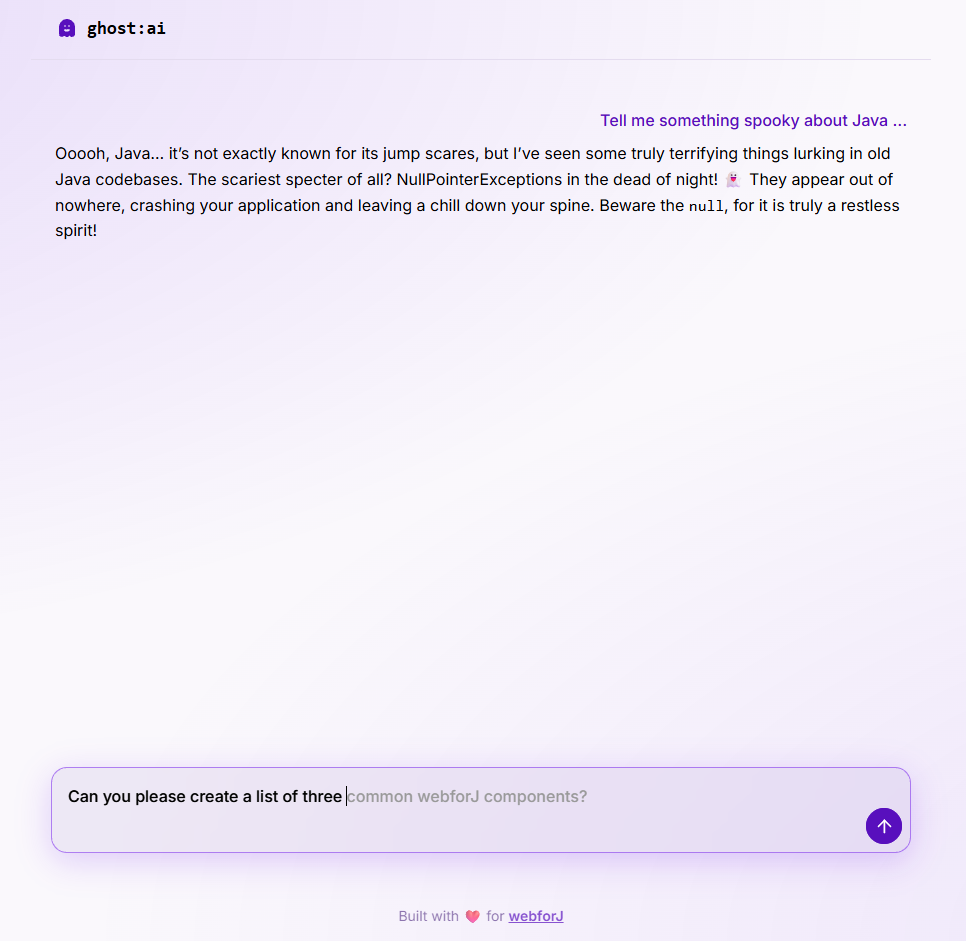
What most tutorials skip is what the feature looks like end to end: the streaming UI, the cancel behavior, the prompt shape, the error surface, and how it all hangs together in a real Java app. This post uses ghost:ai, a small open source reference project in the built-with-webforJ collection, as the running example. Every code snippet is real code from that project.

ghost chat interface