App badges 26.01
webforJ exposes two complementary badge APIs. App.setBadge paints the operating system app icon shown on the dock, taskbar, or home screen. Page.setIconBadge paints the document favicon shown in the browser tab strip. They target different surfaces and have different prerequisites, so most apps call both for the broadest visibility.
App icon badge
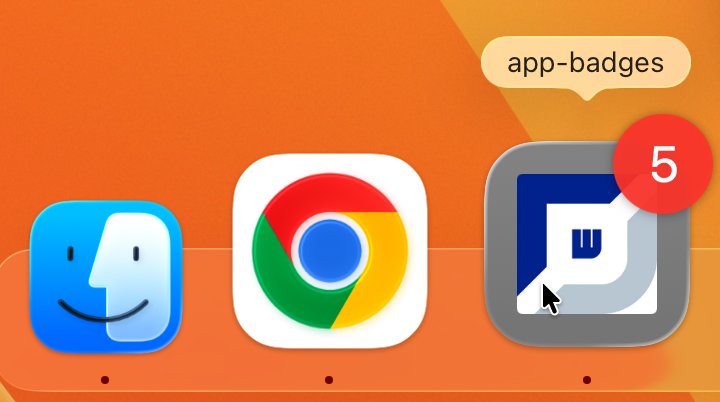
App.setBadge renders the badge on the icon the operating system uses for the app: the macOS dock, the Windows taskbar, the Chrome OS shelf, or the Android home screen.
Prerequisites
The badge is visible only when all of the following are true:
- The browser supports drawing badges on app icons.
- The page is served from a secure context (HTTPS, or
http://localhostduring development). Plain HTTP origins reject the call. - The app has been installed on the device. The installation flow varies by browser: Chromium browsers offer an install prompt for any page that ships a manifest, Safari on macOS uses File → Add to Dock, and Safari on iOS uses Share → Add to Home Screen.
To make the app installable when running under Spring Boot or a standalone webforJ server, annotate the App subclass with AppProfile. The annotation processor emits the manifest, the app icon link tags, and the meta tags the browser needs to offer the install prompt.
@AppProfile(name = "Inbox", shortName = "Inbox")
public class Application extends App {}
See the Installable Apps page for the full list of @AppProfile members, icon sizing, and platform specific guidance on the install flow.
Browser support
After installation, badge rendering depends on the browser. Install support itself is covered on the Installable Apps page.
| Browser | Badge rendered after install |
|---|---|
| Chrome, Edge, Opera, and other Chromium browsers (desktop and Android) | Yes |
| Safari on macOS Sonoma (Safari 17) and later | Yes |
| Safari on iOS 16.4 and later | Yes |
| Firefox (all platforms) | No. The call returns without rendering. |
Setting and clearing the badge
Pass a positive integer to display a numeric badge. Pass null or 0 to clear it. Call the no argument overload to display the flag indicator (a small dot, exact visual is platform defined).
App.setBadge(5);     // numeric badge
App.setBadge();      // flag indicator without a number
App.setBadge(0);     // clear
App.setBadge(null);  // clear
App.setBadge returns immediately. The browser writes the badge to the operating system surface asynchronously, and the change isn't reported back to the app.
Browser tab icon badge
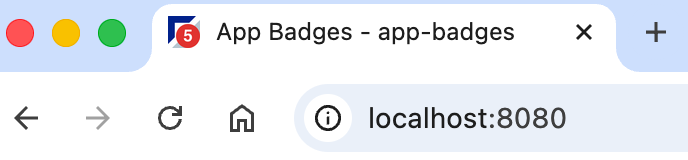
Page.setIconBadge paints the count onto the document favicon. It works in any tab without installation and requires no manifest. The badge is visible in the browser tab strip and in any other location that renders the favicon, such as bookmarks or recent pages views.
Setting and clearing the badge
Page page = Page.getCurrent();

page.setIconBadge(5);     // numeric badge
page.setIconBadge();      // flag indicator without a number
page.setIconBadge(0);     // clear
page.setIconBadge(null);  // clear
Clearing the badge restores the original favicon.
BBjServicesWhen the app is served by BBjServices, the favicon is the Shortcut Image configured for the app in Enterprise Manager. The badge is painted onto whatever icon Enterprise Manager serves. If no shortcut image is configured, Page.setIconBadge has no favicon to overlay and silently does nothing.
Styling the badge
Pass an IconBadgeOptions to control color, shape, and size:
IconBadgeOptions options = new IconBadgeOptions()
    .setColor(new Color(0x2e, 0x7d, 0x32))
    .setShape(IconBadgeOptions.Shape.SQUARE)
    .setSize(1.25);

Page.getCurrent().setIconBadge(5, options);
The options object is a value holder. All setters return this so calls can be chained.
| Option | Type | Default | Notes |
|---|---|---|---|
color | java.awt.Color | #e53935 | Background color of the badge. Text color is derived automatically for contrast, so the digits stay readable on any chosen color. |
shape | Shape | CIRCLE | CIRCLE or SQUARE. |
size | double | 1.0 | Relative size. 0.5 is half the default diameter; 1.5 is 50% larger. The badge is clamped to fit inside the favicon canvas. |
Browser caveat
Safari doesn't refresh the favicon after the initial page load. Calls to Page.setIconBadge complete without error, but Safari continues to display the original icon. Use Page.setTitle to also prepend the count to the document title if you need a visible cue in Safari.
int unread = 5;
Page page = Page.getCurrent();
page.setIconBadge(unread);
page.setTitle("(" + unread + ") Inbox");
Choosing between the two
| Surface | API | Requires install | Visible in Safari |
|---|---|---|---|
| Operating system app icon | App.setBadge | Yes | Yes (macOS Sonoma / iOS 16.4 and later) |
| Browser tab favicon | Page.setIconBadge | No | No. The call completes without error, but the tab strip doesn't refresh. |
Most apps call both so the badge is visible whether the user is inside an installed window or in a regular browser tab.