AI Assistant
craftforJ includes a full coding agent that works inside your running app. It writes Java freely, compiles what it wrote before you ever see it, applies the change, and carries on working after your app restarts. Everything it does, it does against the app that's actually running in front of you, rather than against a guess made from your repository.
Working against the running app and compiling its own output makes the agent considerably more accurate than one writing blind. It can still be wrong. Review what it did before you keep it.
It writes Java
The agent isn't limited to the property changes you can make by hand. Describe a problem and it writes the code for it, adding methods, changing logic, and restructuring a view as the task requires.
Every edit it writes is staged rather than written to disk. Staged edits go straight to a real Java compiler, and the agent reads the diagnostics that come back and fixes its own mistakes before the change is ever offered to you. What reaches your review is code that already compiles against your running app.
Full validation needs a JDK. On a JRE, craftforJ falls back to parsing the code, marks the edit as unverified, and instructs the agent to say so rather than presenting it as checked.
Applying a change restarts your app. The agent waits for the restart, reconnects, and picks its plan up where it left off, so a task that spans several edits and restarts runs to completion.
It works in steps
You give the agent a goal, not a command. It plans, inspects whatever it needs, acts, checks the result, and corrects itself, running many steps in a single turn without you driving each one. Each step appears in the transcript as it happens, and you can expand any of them to see exactly what the agent called and what came back.
What it can reach
The agent has a large toolset covering everything craftforJ knows about your app, including:
- Your components - the live tree, the real property values, and the Java that built each one. It can change properties, remove components, and highlight one in the page.
- Your source - reading any file under your project root, staging edits, showing diffs, and applying them.
- Your routes - the routing table, the active route, navigating anywhere, and changing the access rules declared on a route.
- Your theme and styles - reading and setting design tokens, saving a theme, and searching the available fonts and icons.
- The page itself - injecting CSS and JavaScript against the live page, and taking a screenshot of a component to look at it.
- The webforJ knowledge base - the same documentation, component styling surface, and
--dwc-*token tools the webforJ MCP server gives your editor. It's built in and always available.
Because it reaches all of this through craftforJ, it works with the same information you do. It reads real values, not the ones your source implies.
Approvals
You decide up front how much the agent may do on its own:
- Ask before acting - every action with an effect stops for your approval.
- Apply edits automatically - the agent works freely but still asks before it removes something or runs a script.
- Run autonomously - the agent works without stopping.
When the agent does ask, the request appears inline in the transcript with the action it wants to take, and you can allow it once or for the rest of the conversation.
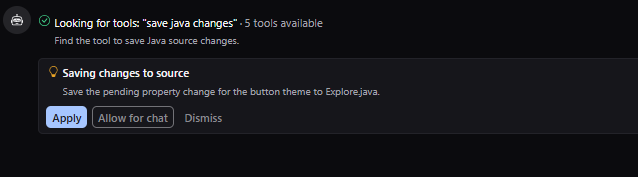
If you're new to the agent, start by having it ask for everything. Once you've watched it work, letting it apply its own edits removes most of the interruptions while keeping the decisions that matter with you.
Working with the app in a conversation
The agent reads what it needs as it needs it rather than being handed your whole app up front, and craftforJ shows you what's attached to the conversation. You can hand it a component directly from the tree, or pick one off the page in the middle of a conversation. For questions about how something looks, the agent can take a screenshot of a component. This requires a model that accepts images.
A screenshot carries any data your app is displaying at that moment. Consider that before you point a hosted model at an app running against real data.
Configuring a model
craftforJ ships no model of its own, so you choose the one that runs it. Add an API key for one of the supported providers, or point craftforJ at a model running locally. Your key is stored on the machine running your app, and the assistant holds it in memory only for as long as the page is open, never in browser storage. It talks to the provider you chose from the browser rather than through your server, and to nobody else.
The model picker shows what distinguishes one model from another, including how much of your app and conversation fits at once, what a conversation costs, and whether the model accepts images or reasons before answering. A model that can't call tools can hold a conversation but can't inspect or change anything.
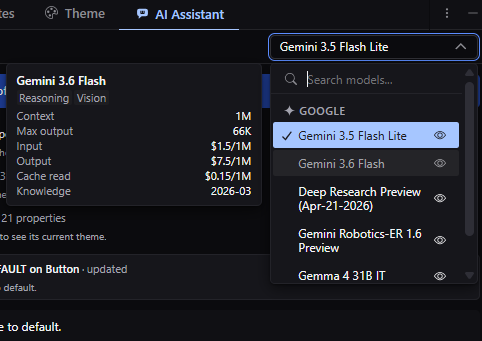
Running a model locally keeps everything on your machine. Local models often default to a small context window, which a conversation about a real app fills quickly, so give the model as much context as your machine can carry.
Conversations
Conversations are kept per app, and the agent can look back over earlier ones when a question refers to work you did before. When a conversation outgrows the model's context, craftforJ summarizes the older messages so the work continues rather than failing, and notes in the chat that it did.
When the work outgrows craftforJ, you can summarize the conversation and hand it to your editor's assistant. That assistant picks the work up more accurately with the webforJ AI plugin installed.
Turning it off
The ai.enabled property removes the assistant from craftforJ entirely. The ai.freeform-changes property keeps the assistant but stops it writing Java of its own.