Writing Changes to Source
Changing a property in craftforJ changes the running app and nothing else. To keep a change, you review it and write it into the Java file it came from. This page describes that step.
Keep your work in version control. Read the diff before you apply it, and read it again before you commit.
Pending changes
Every property you change is recorded as a pending change, and craftforJ shows how many are waiting. Pending changes survive a page reload and a route change, because craftforJ reapplies them when your components are rebuilt.
Reviewing and applying
Press Cmd/Ctrl + S to open the review. Changes are grouped by the file they'll land in. Each one shows the property with its old and new value, and expands into the diff of the file. If a change would replace a computed value with a fixed one, craftforJ warns you and names the expression it's about to replace. Nothing is written until you apply. Before you do, you can revert or discard each change on its own.
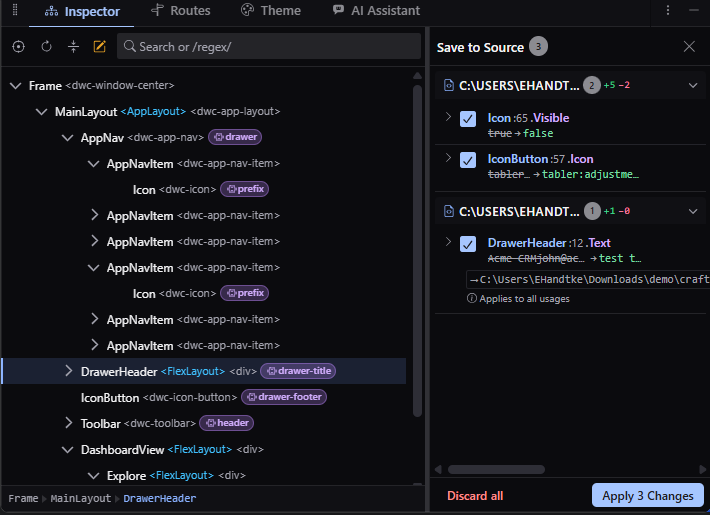
Choosing where a change is written
Where a change is written determines how far it reaches. When a component is built directly in a view, the change goes into that view. When it's built inside a reusable class, you have two options:
- The usage - the place the component is used, which changes only the screen in front of you. This is the default.
- The definition - the place the component is built, which changes every screen that uses it.
Each pending change shows which of the two applies and lets you switch between them. Some properties can only be written at the definition, because the component sets them itself rather than accepting them from the caller. craftforJ marks those before you apply.
After you apply
Writing Java causes your app to rebuild and restart. craftforJ reports the restart, waits for it, and reconnects with your selection and your remaining pending changes intact. Applied changes leave the pending list once they're in your files.
This is the only point where your reload setup matters. craftforJ doesn't need live reload to work, because everything you change while inspecting takes effect in the running app straight away, with no rebuild involved. Writing to source is different: it changes a file your app was built from, so the app has to rebuild before the change comes from your code rather than from craftforJ. With live reload configured, that happens on its own. Without it, restart the app yourself.
Turning it off
You can switch off writing to Java for an app in craftforJ settings, or remove it entirely with the source-changes property. With either turned off, property editing still works but stays live.